

Contact



CRM data loses accuracy faster than most teams realize. Research shows that B2B contact data can decay by around 30% each year, meaning nearly one in three records becomes outdated within 12 months if it isn’t continuously maintained.
HubSpot is strong at capturing activity and managing pipelines, but it is not built to keep that underlying data fresh as people change jobs, companies reorganize, and information ages. Without ongoing enrichment, sales and marketing teams are left relying on manual updates, one-time data pulls, or disconnected tools, which slows execution and weakens targeting, personalization, and reporting.
This guide explains how Clay’s HubSpot integration closes that gap. You will learn how Clay syncs and enriches CRM data automatically, what information can flow between the two platforms, and how teams use this setup to keep HubSpot clean, current, and ready for revenue-driving workflows.
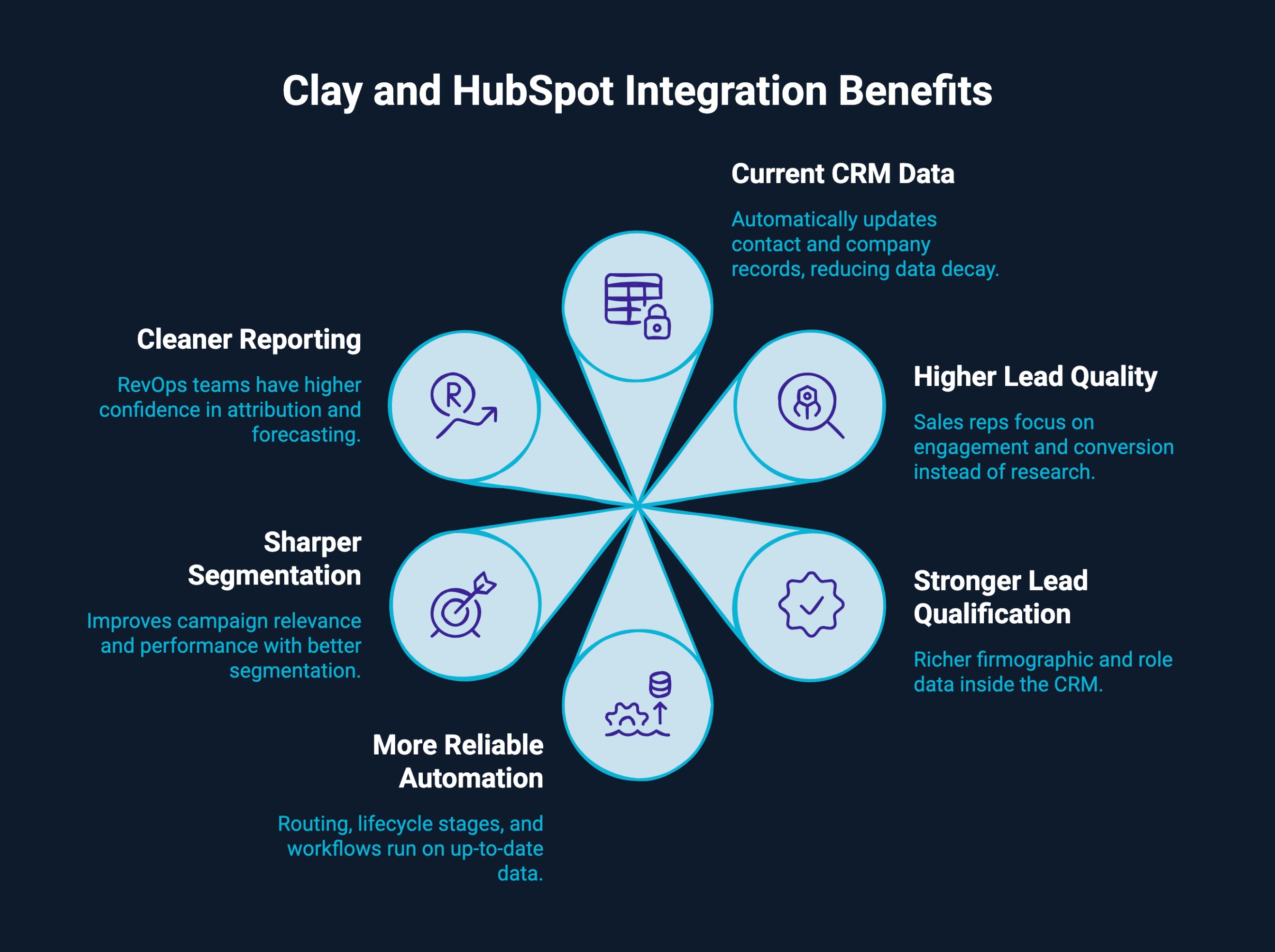
Integrating Clay with HubSpot keeps CRM data accurate as people, roles, and companies change. Instead of static enrichment, teams get continuously refreshed data that improves execution across sales, marketing, and RevOps.
Why businesses integrate Clay with HubSpot:
Together, Clay and HubSpot turn the CRM into a living revenue system that scales with your go-to-market motion and supports faster, more confident decisions.
Clay is built to support modern, multi-CRM revenue teams. Beyond HubSpot, Clay integrates with Salesforce, Microsoft Dynamics 365, Pipedrive, and Close, enabling the same enrichment and automation workflows across different systems. This makes it easier for teams to scale, migrate CRMs, or run multiple go-to-market motions without rebuilding their data foundation.
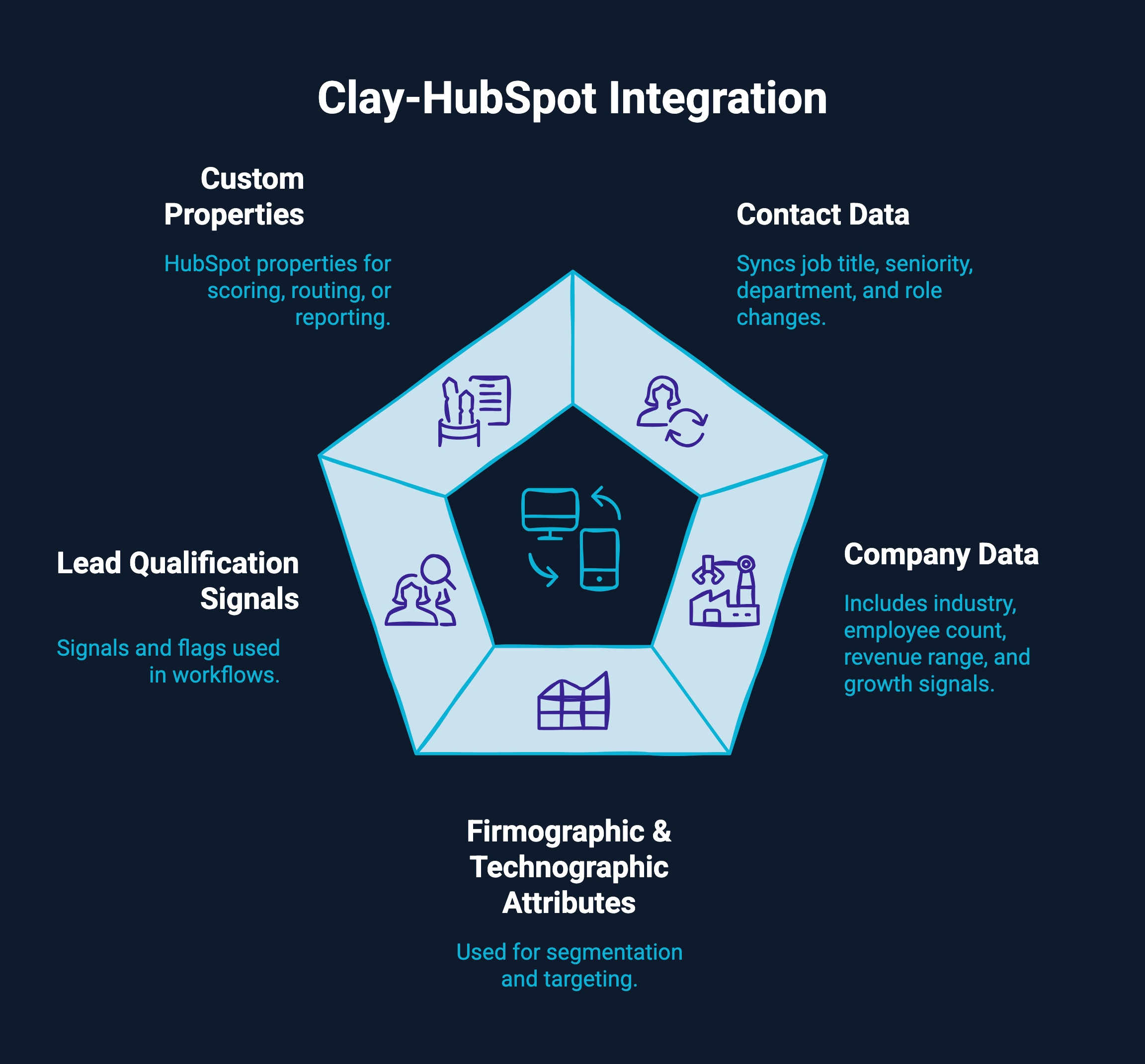
Clay and HubSpot support bi-directional data flow, which means records can move from HubSpot into Clay for enrichment and analysis, then back into HubSpot as updated, structured fields. This allows teams to treat HubSpot as the system of record while Clay operates as the intelligence and enrichment layer behind it.
Common data points that can be synced and enriched include:
Because Clay supports flexible mapping, enriched data can be written into existing HubSpot fields or into new custom properties. This ensures enrichment enhances your current CRM structure instead of disrupting it, while keeping HubSpot records clean, consistent, and automation-ready.
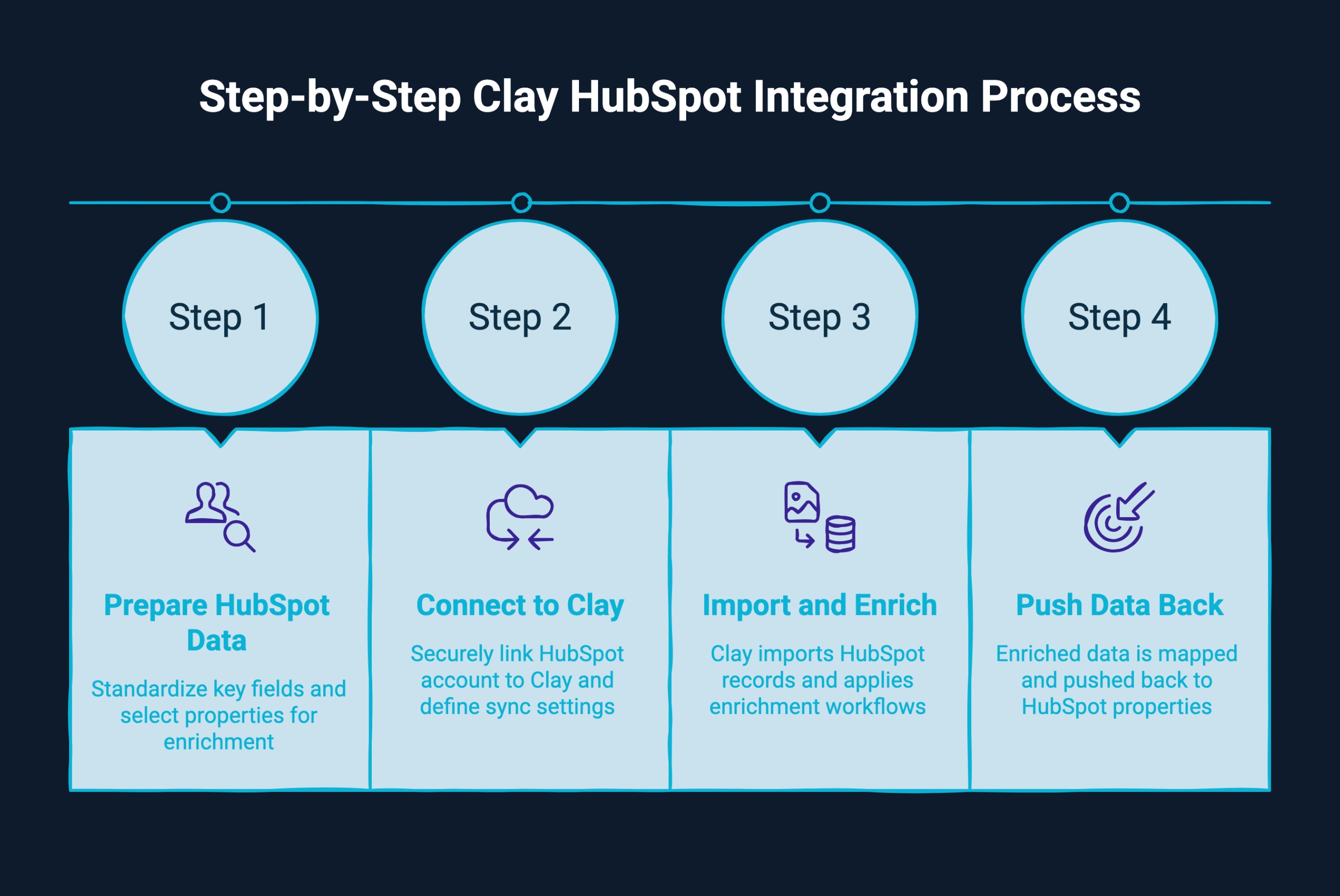
Setting up the Clay–HubSpot integration follows a clear, 4-step flow designed to keep your CRM clean while enabling continuous enrichment. Each step builds on the previous one, ensuring that data moves between HubSpot and Clay in a controlled and scalable way.
Begin by reviewing your existing HubSpot records. Standardize key fields such as job title, company name, domain, and lifecycle stage, and decide which properties should be enriched. This reduces the risk of duplicates, inconsistent formatting, or accidental overwrites once syncing begins.
Next, connect your HubSpot account to Clay using Clay’s native CRM integration. This securely links the two platforms and allows Clay to access selected HubSpot objects, such as contacts and companies. At this stage, you define which records Clay can import and how the sync should operate.
After the connection is established, Clay imports the selected HubSpot records into its workspace. Enrichment workflows can then be applied to fill missing contact details, update firmographic attributes, and add qualification signals. These workflows can be configured to update only specific fields to maintain CRM consistency.
Finally, enriched data is mapped back to HubSpot properties. Teams can choose whether Clay updates existing fields or writes to new custom properties, giving full control over how data is stored and used. This step ensures HubSpot remains the system of record while benefiting from continuously refreshed information.
This structured approach allows teams to enrich CRM data without disrupting existing processes or automation.
Once Clay and HubSpot are connected, automation becomes the real advantage. Instead of enriching records on a one-off basis, teams can set up workflows that continuously update contact and lead data as it changes, keeping HubSpot accurate without manual effort.
Clay can automatically pull new or updated records from HubSpot based on triggers such as lifecycle stage changes, list membership, or custom property values. These records are then enriched in Clay using predefined rules, ensuring that only relevant data is added or refreshed before being sent back to the CRM.
Key automation capabilities include:
With this setup, HubSpot workflows, lead routing, and scoring logic operate on consistently up-to-date data. The result is a CRM that updates itself in the background while sales and marketing teams focus on execution rather than maintenance.
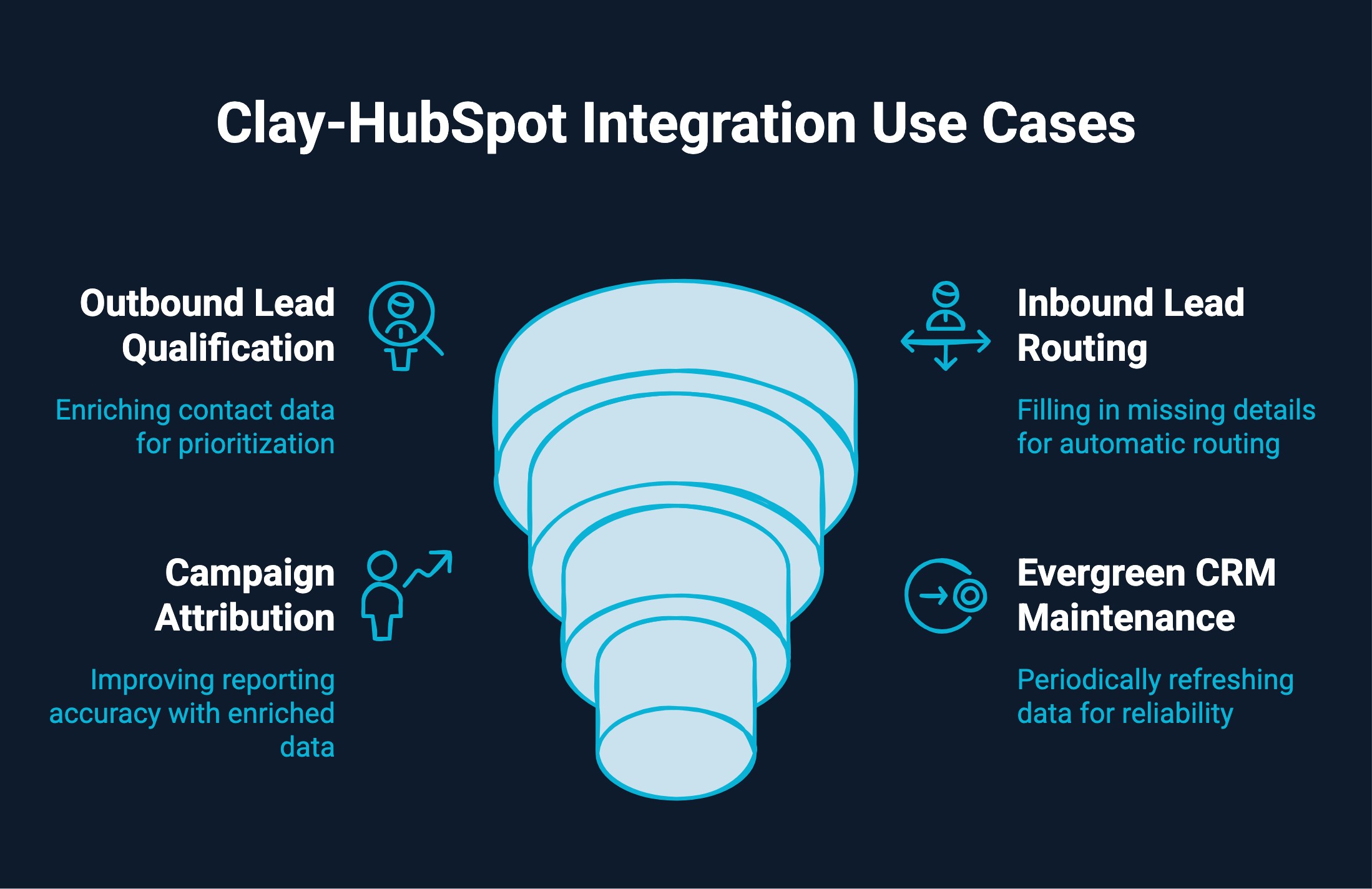
The Clay–HubSpot integration supports a wide range of revenue workflows by keeping CRM data accurate and actionable across the funnel. Teams typically use this setup to improve lead quality, automate routing, and maintain long-term data hygiene without relying on manual updates.
For outbound teams, Clay enriches contact and company records inside HubSpot with current role, seniority, and firmographic data. This helps sales teams prioritize the right accounts, filter out poor-fit leads, and tailor outreach based on up-to-date context rather than static lists.
Inbound leads often arrive with limited information. Clay fills in missing details such as company size, industry, or job function, allowing HubSpot workflows to route leads to the correct owner or pipeline automatically. This reduces delays and ensures high-intent leads reach the right team faster.
Accurate attribution depends on clean data. By enriching HubSpot records with consistent firmographic and account-level information, Clay improves the quality of campaign reporting. Marketing teams can better understand which segments convert, which channels perform best, and how enrichment impacts pipeline and revenue.
Over time, CRM data naturally degrades. Clay acts as an ongoing maintenance layer by periodically refreshing contact and company records in HubSpot. This keeps lists usable, automation reliable, and reports trustworthy without requiring constant manual cleanup.
Together, these use cases show how Clay and HubSpot work beyond enrichment, supporting scalable, end-to-end revenue operations.
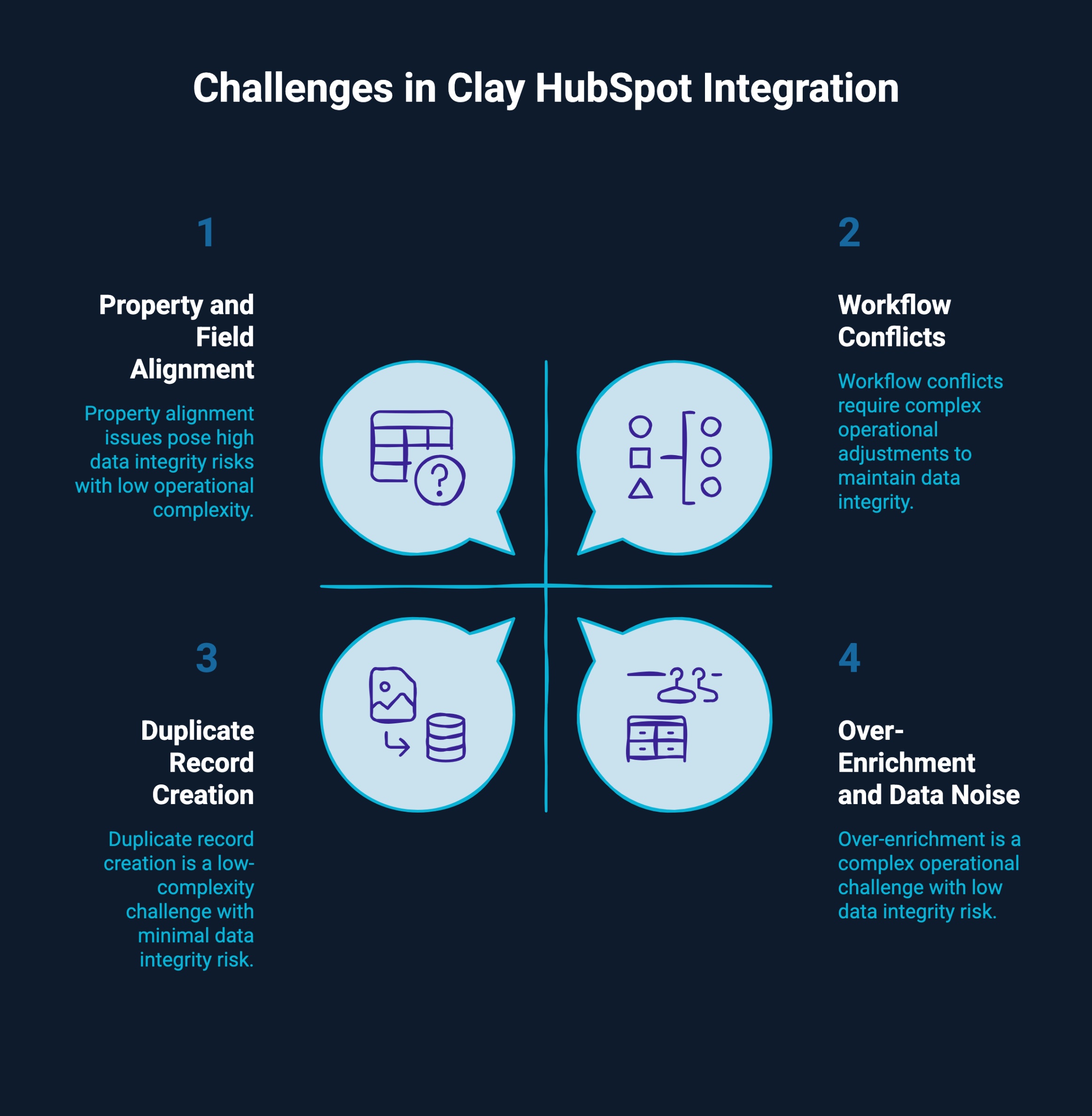
While the Clay–HubSpot integration delivers strong value, teams should plan for a few challenges and address them early to keep CRM data clean and usable.
Inconsistent or duplicated HubSpot properties can cause enriched data to land in the wrong fields or become hard to activate. Defining a clear property framework and mapping rules before enabling write-back helps ensure enriched data supports workflows and reporting.
Updating too many fields without a clear purpose can clutter records and confuse sales and marketing teams. Limiting enrichment to fields tied to routing, scoring, personalization, or reporting keeps HubSpot focused and actionable.
Existing HubSpot workflows may trigger unexpectedly when enriched data is written back. Reviewing automation logic and adding safeguards, such as conditional triggers, helps prevent misrouting or unintended lifecycle changes.
Poor matching logic, missing domains, or inconsistent company naming can lead to duplicate contacts or companies. Standardizing identifiers and applying clear matching rules reduces duplication during syncs.
Clay’s flexibility requires clear ownership across sales, marketing, and RevOps. Establishing guidelines for enrichment logic, sync frequency, and field updates helps teams maintain consistency as usage scales.
By pairing each challenge with a clear mitigation approach, teams can ensure the integration strengthens CRM reliability rather than adding complexity.
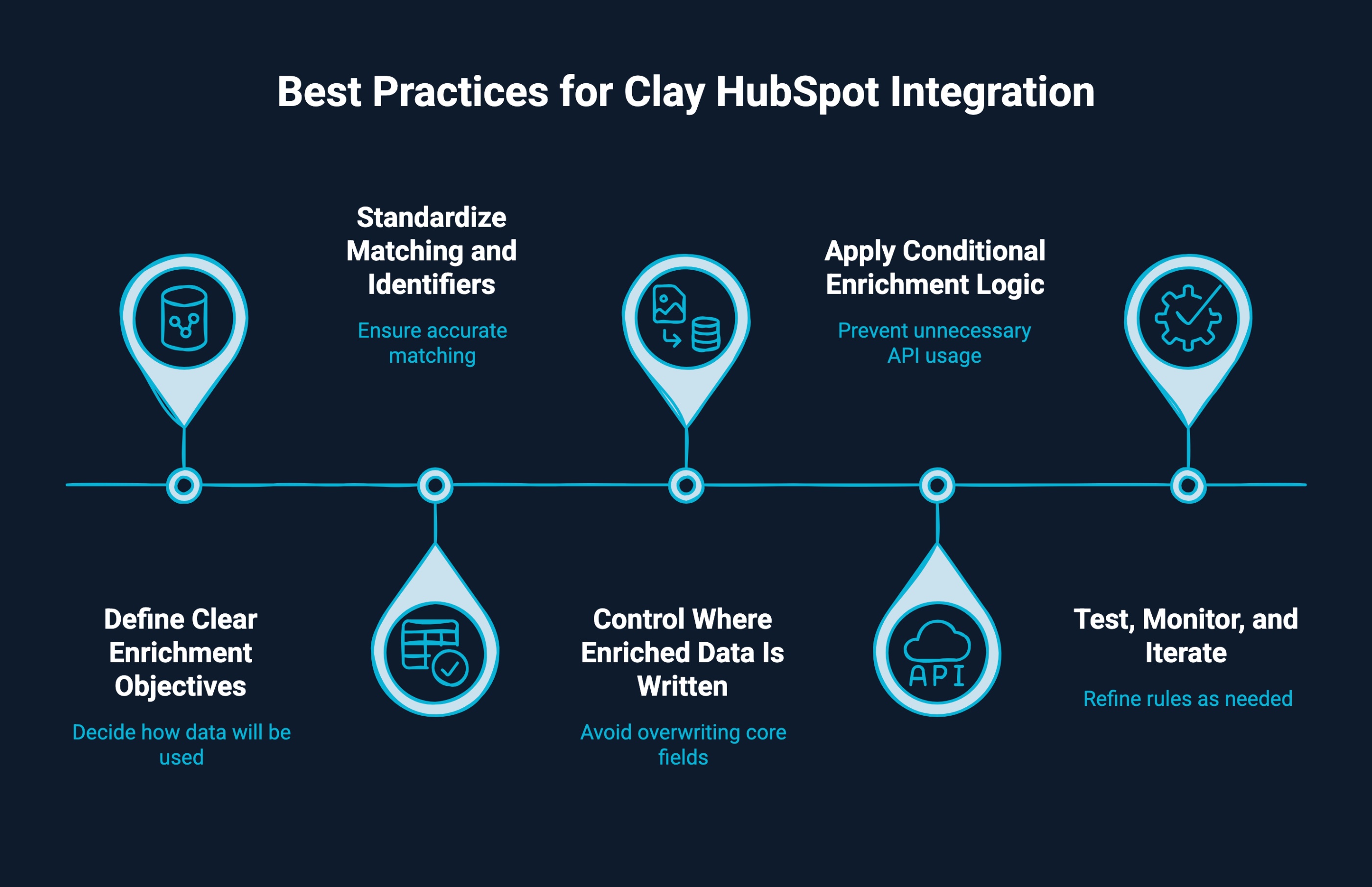
The Clay–HubSpot integration works best when enrichment is treated as a governed, ongoing system rather than a one-time setup. Following proven best practices helps teams maintain data accuracy, protect existing automation, and scale enrichment without introducing noise.
Before enriching anything, decide how the data will be used inside HubSpot. For example, job seniority might support lead routing, while company size may drive segmentation or scoring. When enrichment is tied to a specific workflow or report, teams can measure its impact and avoid collecting data that never gets activated.
Accurate enrichment depends on reliable matching. Domains, company IDs, and normalized company names should be consistently populated before records are sent to Clay. This reduces mismatches and ensures enriched data is written back to the correct contact or company, especially in large or multi-region CRMs.
Avoid overwriting core CRM fields unless there is a strong reason to do so. Many teams create dedicated enrichment properties in HubSpot and reference them in workflows, scoring models, and reports. This preserves historical data, improves transparency, and makes it easier to audit enrichment outcomes.
Not every record requires the same depth of enrichment. Applying conditions based on lifecycle stage, segment, or intent prevents unnecessary API usage and keeps records focused. For example, early-stage leads may only need basic firmographics, while sales-qualified leads benefit from deeper role and account context.
Start with small record sets to validate enrichment accuracy and workflow behavior. Monitor how enriched fields affect routing, scoring, and conversion rates, then refine rules as needed. Regular reviews help ensure enrichment logic stays aligned with changing go-to-market strategies and CRM usage.
When these practices are followed, Clay becomes a reliable enrichment layer that strengthens HubSpot’s role as a trusted system of record rather than overwhelming it with unused data.
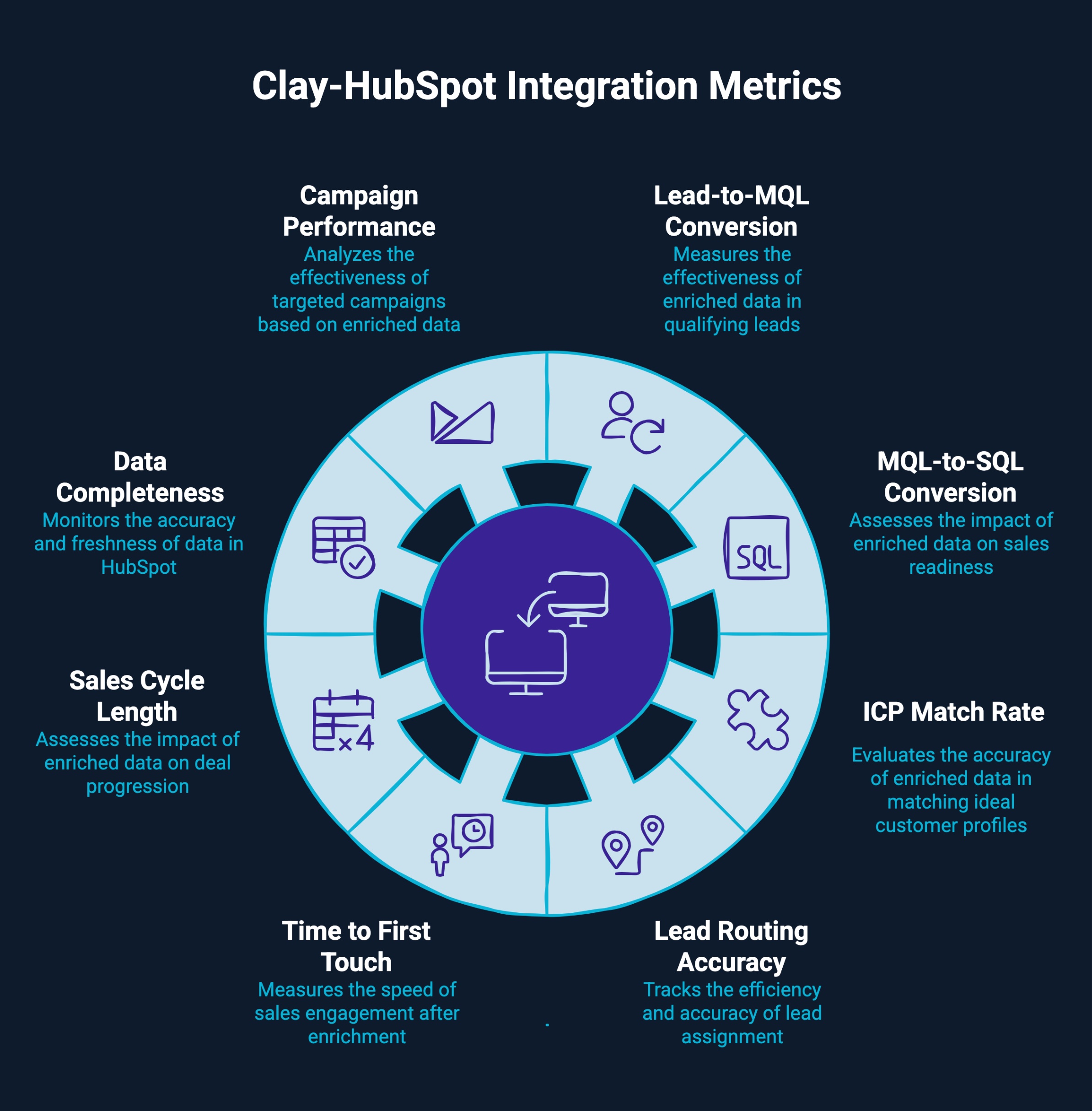
Measuring the impact of the Clay–HubSpot integration requires looking beyond enrichment volume and focusing on how enriched data improves funnel efficiency. The right metrics help teams validate that data quality improvements are translating into better execution and revenue outcomes.
Key metrics to track:
Together, these metrics reveal whether the Clay–HubSpot integration is driving measurable improvements in funnel efficiency, data reliability, and revenue impact, not just adding more data to the CRM.
While Clay and HubSpot provide the tools, the impact of the integration depends on how well it is aligned with revenue workflows. This is where LeadGem adds value.
LeadGem is a B2B growth and revenue operations agency headquartered in Amsterdam, the Netherlands, with over 5 years of experience in B2B growth marketing and growth hacking. As a Clay-certified partner, it helps companies design and implement advanced RevOps and outbound lead generation systems that automate sales processes, enrich CRM data, and support targeted outreach.
The team works with businesses across different countries, including Benelux, the Nordics, North America, and Australia, bringing a strong understanding of regional go-to-market needs. By combining Clay’s enrichment capabilities, HubSpot’s activation layer, and LeadGem’s RevOps expertise, teams get a scalable integration that keeps CRM data clean, actionable, and revenue-focused.
Clean data is what turns a CRM into a growth engine. When Clay and HubSpot work together, teams move beyond static records and manual cleanup to a system that stays accurate as their market changes.
With the right setup and governance, the Clay–HubSpot integration helps sales, marketing, and RevOps teams operate on reliable data, automate with confidence, and make better funnel decisions. It is not just about enrichment, but about building a CRM foundation that supports scalable, predictable revenue growth.
Connect HubSpot contacts or lists to a Clay table, apply Clay’s waterfall enrichment using multiple data sources, then push enriched contact records back to HubSpot custom fields. This enrichment process reduces manual data entry and keeps the company's information accurate.
Clay enrichment resolves CRM pain points by refreshing email addresses, job changes and intent signals in HubSpot contacts. Sales reps get accurate information, a full prospect picture, higher reply rates, and a single source of truth for outbound efforts.
Clay enriches contact and company data, including work email, phone numbers, job titles, job changes, LinkedIn profiles, company info, intent signals, and other key data points, using multiple data providers.
Yes. Clay automates people data updates by detecting job changes, new emails, and updated company information, then syncing accurate data back to HubSpot contacts without manual data entry.
For startups, the Clay–HubSpot integration reduces data gaps, improves prospect lists, and supports outbound efforts with accurate information, helping small sales teams reach the right people with the right message faster.
Yes. Clay offers native no-code HubSpot integrations and supports tools like Zapier. You can also explore options on the clay.com integrations list for custom integrations based on specific needs.
Clay pulls HubSpot contacts into a Clay table, applies AI-driven waterfall enrichment from multiple data sources, and pushes enriched fields back into HubSpot to power workflows, lists, and marketing platforms.
You can track enrichment by writing Clay outputs into custom fields, then using HubSpot lists, filters, and reports to measure data completeness, lead quality, and downstream conversion performance.
Enriched Clay data flows into HubSpot custom objects and fields, enabling revenue reports by segment, company size, role, or intent, giving teams a clearer view of pipeline and deal performance.
Clay’s AI and waterfall enrichment process surfaces accurate, up-to-date insights on prospects, allowing sales reps to tailor messaging, target the right people, and increase engagement and reply rates.