

Contact


.jpg)
Many B2B sales teams struggle to scale, not because of weak demand, but because too much time is lost to manual work. Sales reps often spend hours on CRM updates, follow-ups, and lead management instead of selling, which slows response times and weakens pipeline performance.
As lead volume increases, these inefficiencies become harder to control. Follow-ups rely on individual habits, data quality declines, and visibility into the sales pipeline drops.
This guide explains how HubSpot sales automation helps B2B teams automate their sales process with structure and clarity. You will learn how HubSpot CRM sales automation features, workflows, and sales tools reduce manual effort, improve pipeline control, and enable sales teams to focus on closing deals rather than managing tasks.
HubSpot sales automation is the use of HubSpot’s CRM and sales tools to automatically handle repetitive sales tasks such as follow-ups, deal updates, task creation, and lead assignment. It removes the need for constant manual actions while keeping the sales process consistent and timely.
With sales automation in HubSpot, actions are triggered by buyer behaviour or deal activity. For example, a new lead submission, meeting booking, or deal stage change can automatically update records, assign owners, and prompt the next sales step without rep intervention.
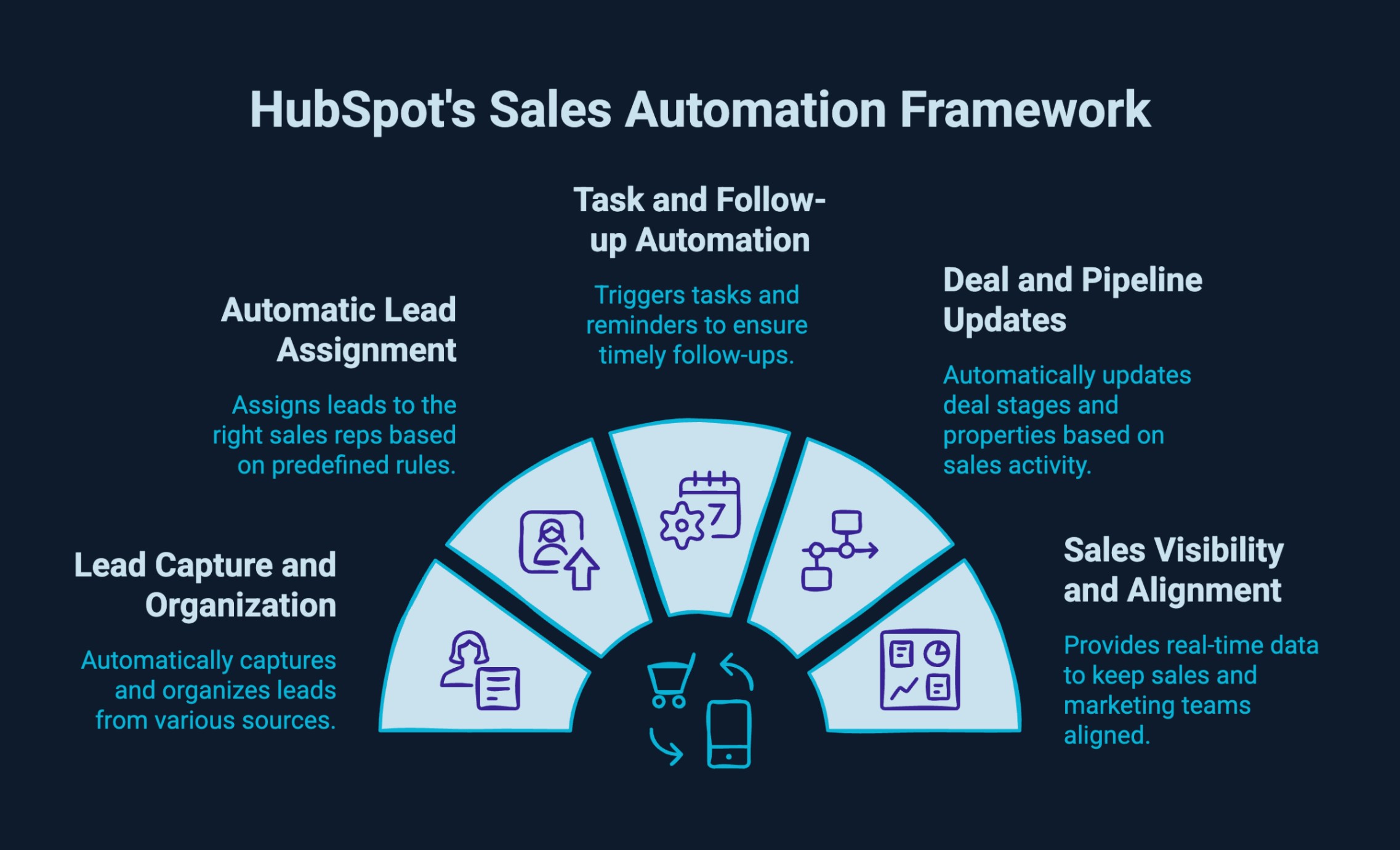
HubSpot automates the B2B sales process by turning lead activity and CRM data into automatic, rule-based actions. Instead of relying on sales reps to manually manage every step, HubSpot ensures leads are captured, followed up, and progressed through the pipeline in a consistent and scalable way.
HubSpot sales automation supports the sales process across key stages, including:
By automating these steps, HubSpot helps B2B sales teams move faster, stay organised, and focus more time on closing deals instead of managing processes.
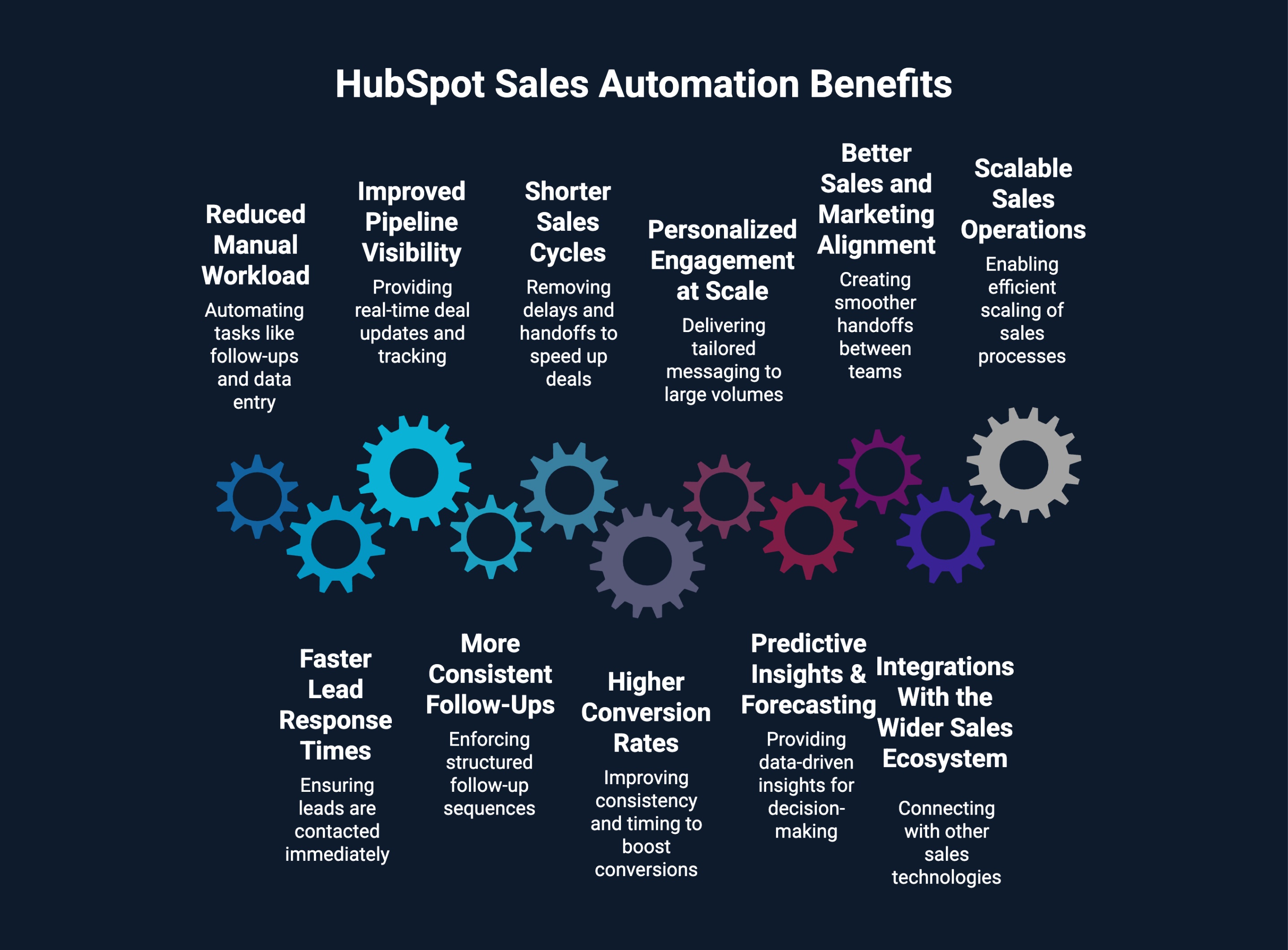
The benefits of sales automation in HubSpot go beyond saving time. By automating repetitive sales tasks, HubSpot helps B2B teams create a faster, more consistent, and more predictable sales process that supports growth at scale.
Key benefits of sales automation HubSpot provides include:
HubSpot automates follow-ups, task creation, deal updates, and data entry, significantly reducing administrative overhead. Sales reps spend less time managing CRM hygiene and more time on high-impact activities like prospecting, discovery calls, and closing deals.
Automated lead routing, notifications, and task assignments ensure new leads are contacted immediately. Faster response times help teams engage prospects while intent is high, increasing the chances of meaningful conversations early in the buyer journey.
Real-time deal updates, automated stage changes, and activity tracking provide sales leaders with a clear view of pipeline health. This visibility makes it easier to identify stalled deals, forecast revenue, and optimize sales performance based on accurate data.
Sales automation workflows ensure that no lead or opportunity is overlooked. HubSpot enforces structured follow-up sequences across emails, calls, and tasks, delivering a consistent buyer experience regardless of which rep owns the deal.
By removing delays and manual handoffs, HubSpot automation keeps deals moving forward. Timely follow-ups, automated reminders, and clear next steps reduce friction and help prospects progress through the pipeline more efficiently.
Automation improves consistency and timing across the funnel, which directly impacts conversion rates. Leads are nurtured properly, opportunities receive timely attention, and reps are guided to take the right actions at each deal stage.
HubSpot uses CRM data such as industry, lifecycle stage, behavior, and deal attributes to personalize outreach automatically. This allows teams to deliver relevant, tailored messaging to large volumes of prospects without sacrificing quality.
With automated data capture and reporting, HubSpot provides reliable insights into deal velocity, win rates, and rep performance. These insights improve forecast accuracy and help leaders make proactive, data-driven decisions.
Shared automation, lifecycle stages, and lead scoring create smoother handoffs between marketing and sales. Both teams operate from the same system and data, reducing friction and improving overall revenue efficiency.
HubSpot integrates seamlessly with email platforms, calendars, calling tools, enrichment software, and other sales technologies. This connected ecosystem ensures automation extends across the entire sales stack, not just within the CRM.
As lead volume and deal complexity increase, HubSpot automation allows teams to scale efficiently. Processes remain standardized and measurable, enabling growth without a proportional increase in headcount.
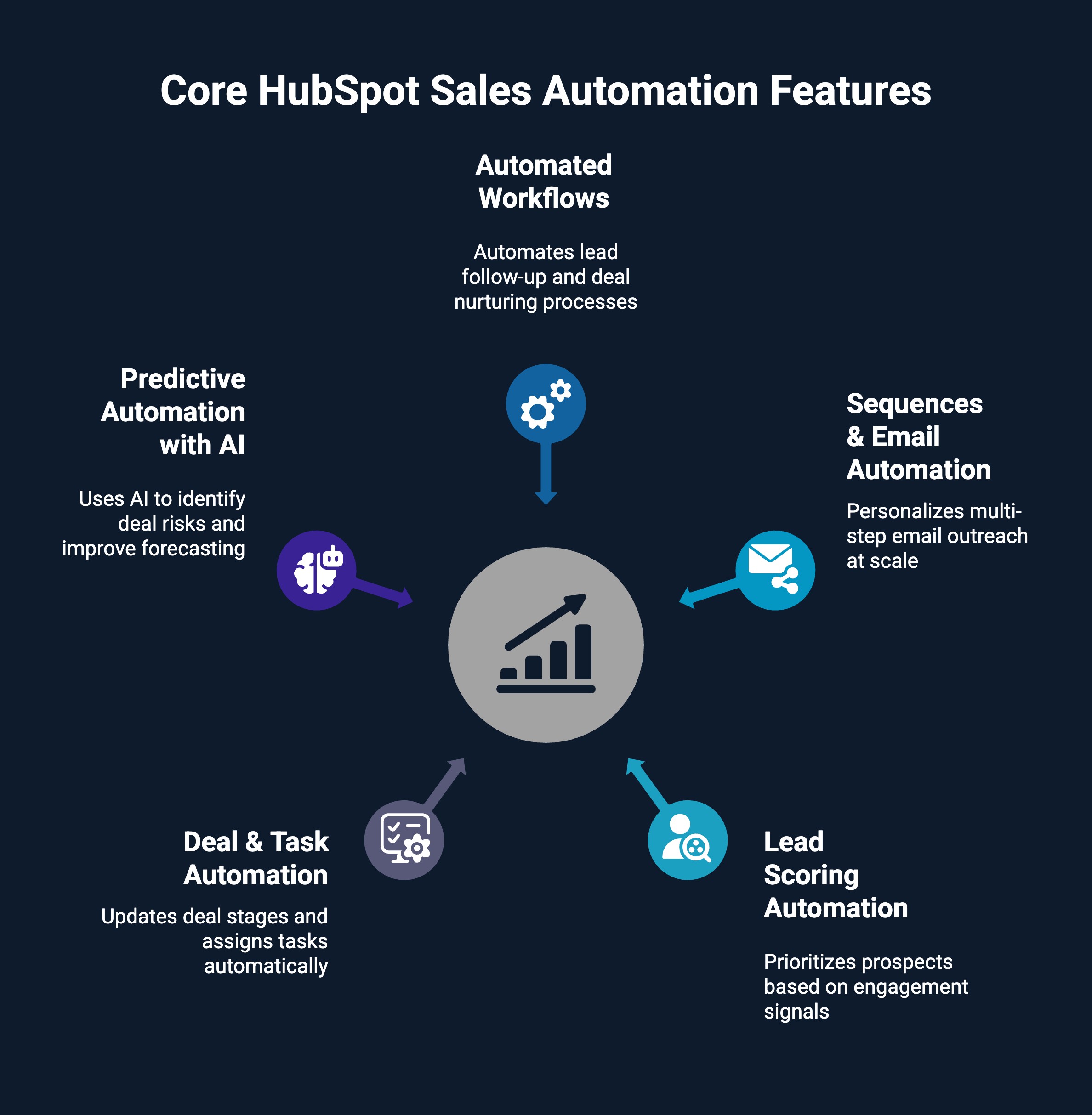
While HubSpot offers a wide range of automation capabilities, B2B sales teams do not need to use every feature to see meaningful results. In practice, focusing on a small set of core sales automation features delivers the greatest impact.
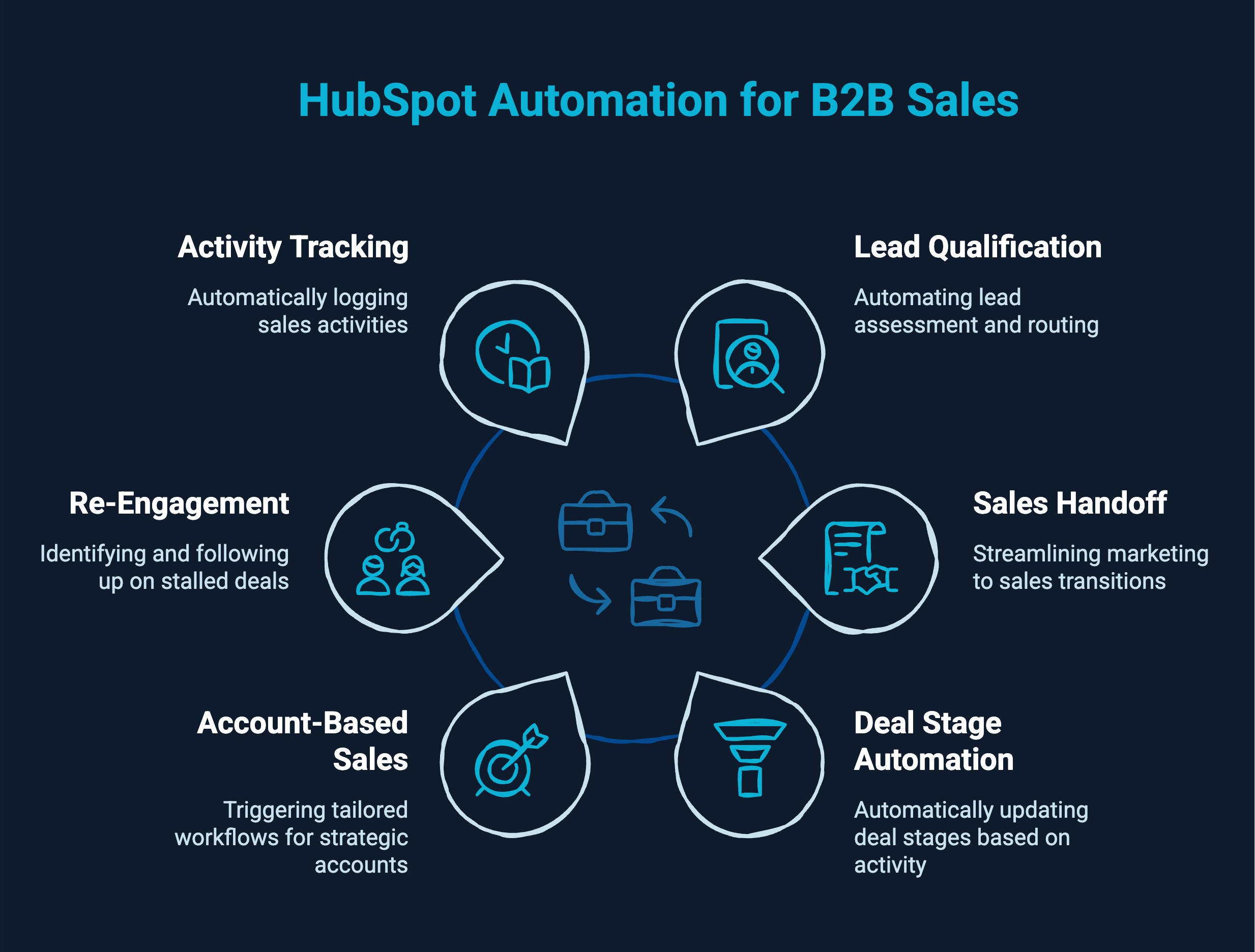
HubSpot automation for B2B sales is most effective when applied to real sales scenarios rather than isolated features. By automating high-impact touchpoints, sales teams can move deals forward with less manual effort and more consistency.
Common HubSpot automation for B2B sales use cases include:
When a new lead enters HubSpot, automation can evaluate engagement data, form submissions, and lifecycle properties to determine sales readiness. Qualified leads are automatically routed to the right sales rep based on rules such as territory, deal size, or company type. This ensures faster response times and prevents high-intent leads from sitting unworked in the CRM.
HubSpot automation removes friction during the handoff from marketing to sales. Once a lead reaches a defined qualification threshold, HubSpot can automatically create a deal, assign ownership, and notify the sales team. This creates a clear transition point and ensures sales teams receive complete context without manual coordination.
As sales reps log emails, calls, or meetings, HubSpot can automatically update deal stages based on activity. This reduces the need for manual pipeline updates and keeps forecasts accurate. Sales leaders gain a real-time view of pipeline health without relying on rep-driven data entry.
For high-value or strategic accounts, HubSpot automation can trigger tailored workflows based on account activity. This may include task creation, internal alerts, or reminders when key contacts engage. These workflows help sales teams focus effort where it matters most while maintaining a personalized approach.
HubSpot can identify deals that have been inactive for a defined period and automatically trigger follow-up actions. This may include creating tasks for sales reps or sending reminder emails, ensuring opportunities are revisited before they are lost.
HubSpot automatically logs emails, calls, meetings, and notes within the CRM. This creates a complete activity timeline without manual input, giving sales managers better visibility into rep performance and deal progress while keeping the CRM clean and reliable.
These use cases show how HubSpot automation for B2B sales helps teams reduce manual work, improve consistency, and manage complex sales processes more effectively.
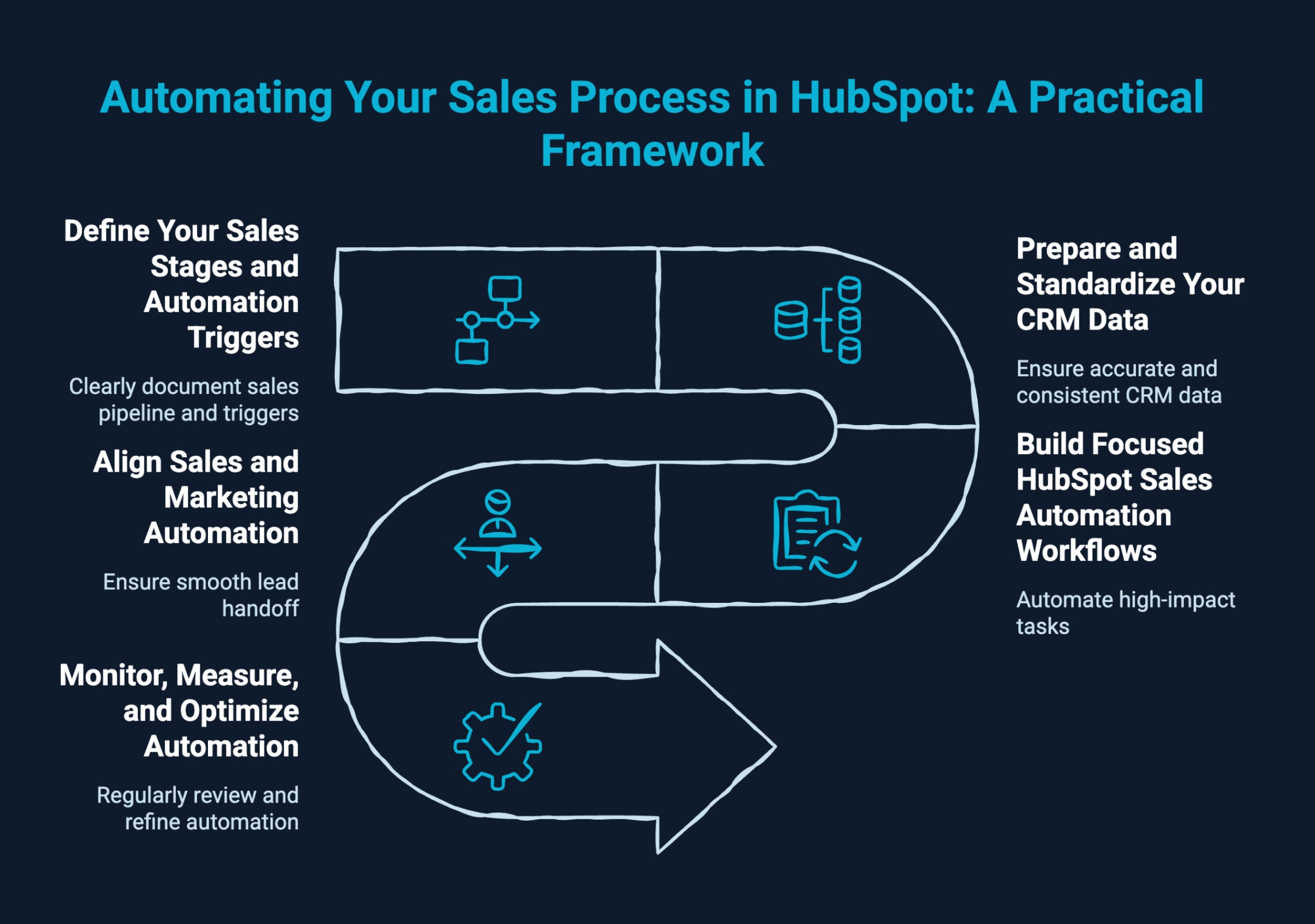
Automating your sales process in HubSpot works best when approached with a clear structure rather than setting up workflows at random. A focused framework helps ensure automation supports sales goals instead of adding complexity.
A practical way to use HubSpot to automate the sales process includes the following steps:
Start by clearly documenting your sales pipeline and the actions that move a deal forward. Identify triggers such as form submissions, meeting bookings, email replies, or deal stage changes. Clear definitions ensure HubSpot sales automation reflects how your team actually sells, not how the tool is structured by default.
Sales automation in HubSpot relies heavily on accurate CRM data. Before building workflows, standardize lifecycle stages, deal properties, and required fields. Clean data ensures automation runs reliably and prevents errors such as incorrect assignments or misfired follow-ups.
Create workflows that automate high-impact tasks like lead assignment, task creation, and internal notifications. Avoid automating full conversations early on. Well-designed HubSpot sales automation workflows support sales reps by guiding actions rather than replacing human judgment.
Effective HubSpot automation for B2B sales depends on alignment between sales and marketing. Define clear handoff points, shared definitions, and ownership rules. This ensures leads move smoothly from marketing to sales with full context and minimal friction.
Sales processes evolve, and automation must evolve with them. Regularly review workflow performance, conversion rates, and pipeline movement. Use reporting insights to refine triggers, reduce noise, and ensure HubSpot sales automation continues to support revenue goals.
By following these steps, B2B teams can use HubSpot to automate the sales process in a controlled, scalable way that improves efficiency without sacrificing flexibility.
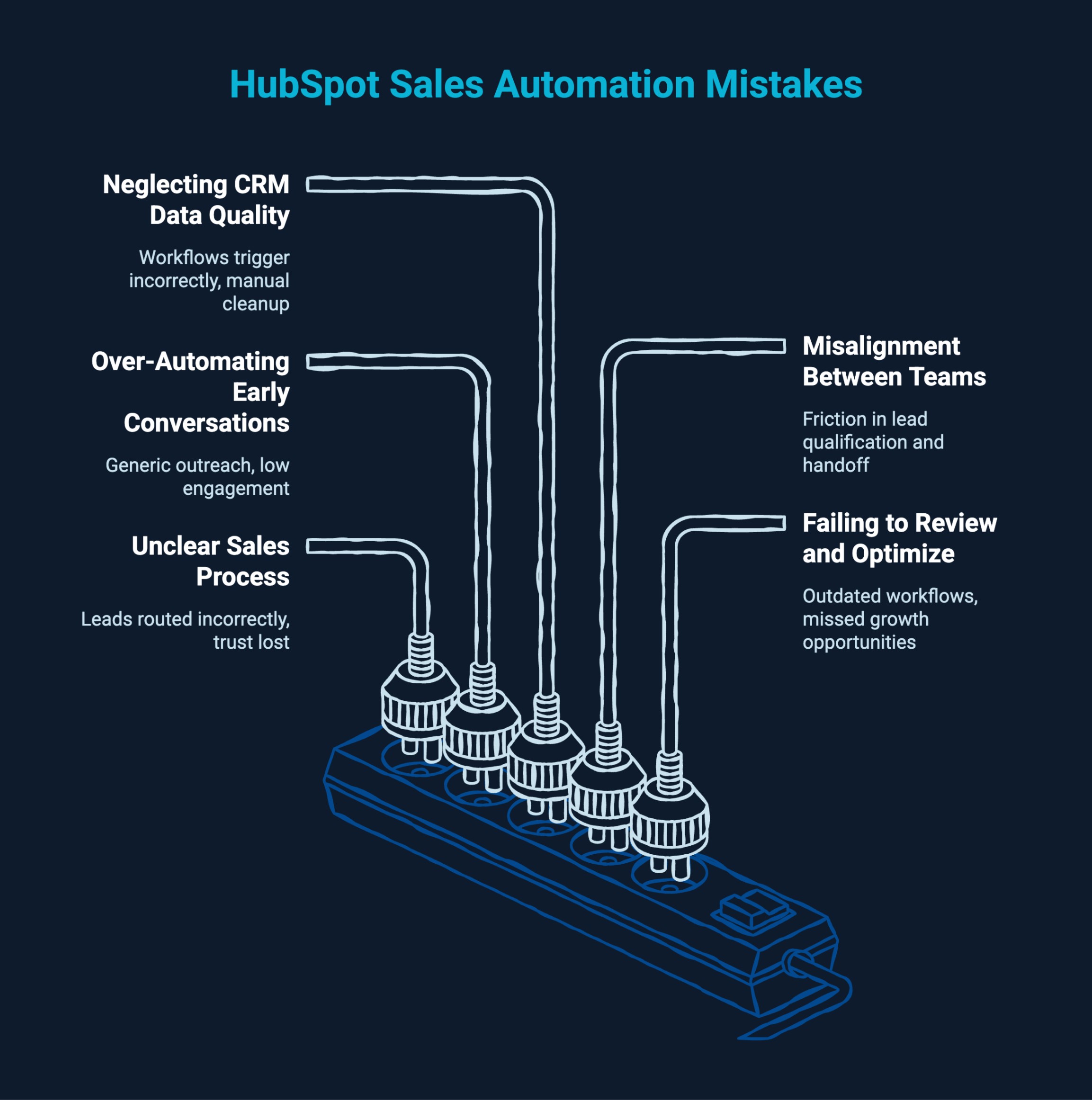
HubSpot sales automation is powerful, but its impact depends on how thoughtfully it is implemented. Many issues arise not from the platform itself, but from process gaps and rushed setup decisions.
When sales stages, ownership rules, and handoff points are unclear, HubSpot sales automation workflows lack direction. This often leads to leads being routed incorrectly, deals moving to the wrong stages, and sales reps losing trust in the CRM. A clear sales process should always come before automation.
Automating too many emails or actions at the top of the funnel can make outreach feel generic and impersonal. While HubSpot sales automation can support follow-ups, early-stage conversations still require human context and judgment to build trust and engagement.
HubSpot automation relies on accurate and consistent data. Incomplete fields, inconsistent property usage, or outdated records can cause workflows to trigger incorrectly or not at all. Poor data quality reduces the effectiveness of sales automation and increases manual cleanup work.
Without shared definitions for lead qualification and handoff timing, automation can create friction. HubSpot automation for B2B sales works best when both teams agree on lifecycle stages, ownership rules, and success metrics.
Sales processes evolve, but many teams leave automation untouched after initial setup. Without regular reviews, workflows become outdated, noisy, or misaligned with current goals. Ongoing optimization ensures HubSpot sales automation continues to support growth.
Avoiding these mistakes helps teams build a reliable, scalable sales automation system that delivers consistent results.
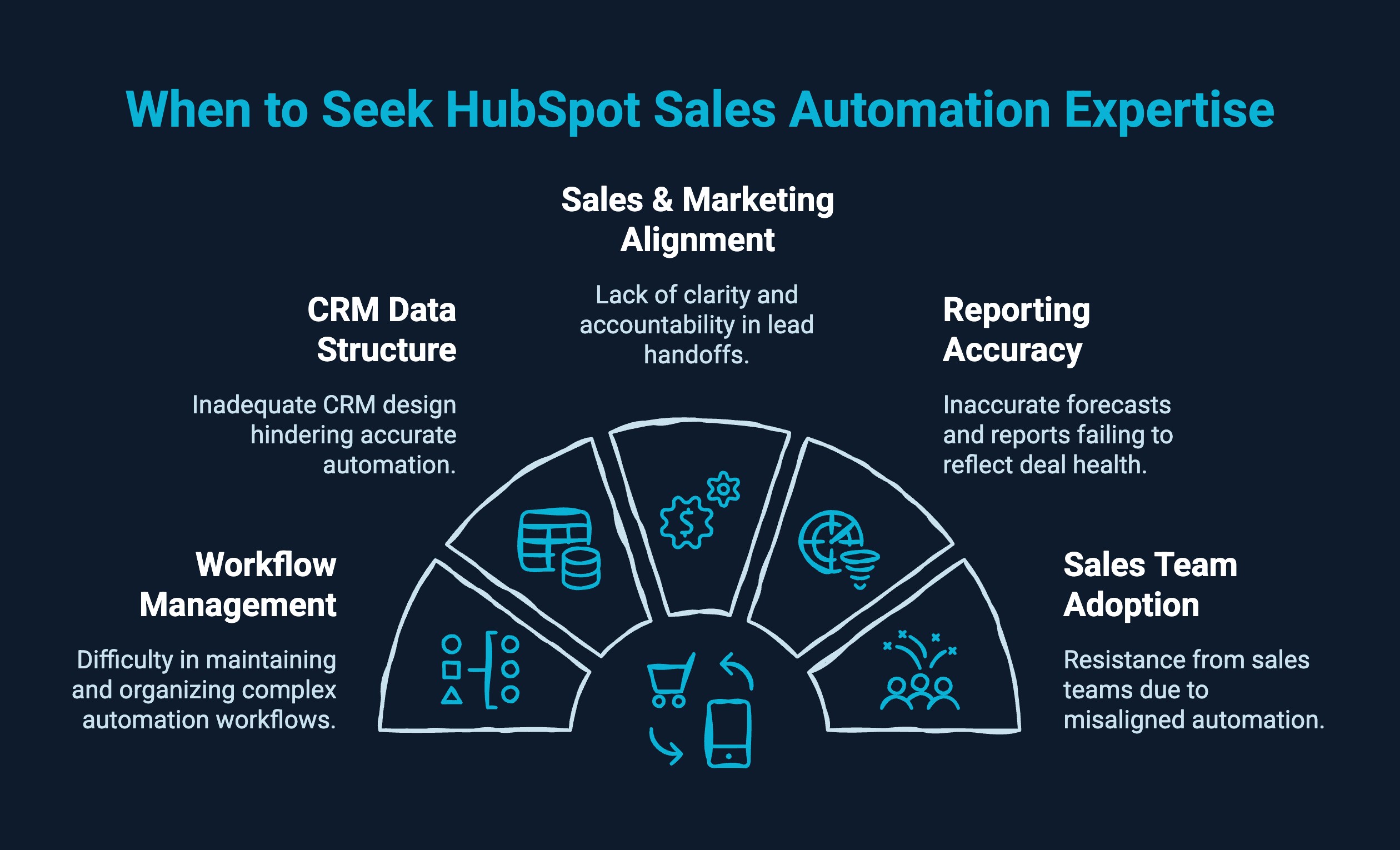
HubSpot sales automation works well out of the box, but as sales processes grow more complex, many teams reach a point where internal setup is no longer enough. This is usually when automation exists, but the results do not match expectations.
HubSpot sales automation often needs expert support when:
Expert support helps align HubSpot CRM sales automation features with real sales workflows. Instead of adding more automation, specialists focus on simplifying logic, improving data foundations, and optimizing workflows so HubSpot sales automation supports revenue growth rather than creating friction.
LeadGem is a B2B growth and revenue operations agency headquartered in Amsterdam, the Netherlands, focused on building advanced RevOps and outbound lead generation systems. With 5+ years of experience in B2B growth marketing and growth hacking, we help companies turn HubSpot sales automation into a scalable revenue engine.
As a Clay-certified partner, we specialize in automating sales processes, enriching lead data, and creating targeted outreach campaigns that drive predictable pipeline growth. Our approach goes beyond setup and aligns HubSpot CRM sales automation features with real sales workflows.
LeadGem serves B2B companies across Benelux (Netherlands, Belgium), the Nordics (Sweden, Norway, Denmark), as well as America and Australia, making them a strong partner for teams scaling across markets.
HubSpot sales automation delivers the most value when it quietly removes friction from the sales process. When automation supports data accuracy, follow-ups, and pipeline flow without interrupting human conversations, sales teams can focus on closing deals instead of managing systems.
Used this way, HubSpot automation becomes a steady advantage that scales with your business rather than a layer of complexity.
Yes. HubSpot offers sales automation through Sales Hub, Marketing Hub, and Service Hub, helping teams automate repetitive tasks, contact management, lead scoring, sales emails, and workflow automation.
HubSpot sales automation stands out with native workflow automation, predictive lead scoring, and strong CRM integration, using historical data and machine learning to reduce manual tasks and improve sales efficiency across the tech stack.
HubSpot Sales Hub supports deal management, outbound sales, lead nurturing, sales emails, and opportunity management, helping sales teams prioritize hot leads, improve rep productivity, and close deals more efficiently.
With the right automation strategy, HubSpot automation transforms sales efforts by improving data hygiene, deal stage movement, sales forecasting, and continuous improvement through AI-powered workflow actions and sales intelligence.
Set up workflow automation in HubSpot by defining enrollment triggers, selecting workflow actions, and aligning them with your sales strategy. HubSpot sales tools and automation help reduce manual tasks and improve sales efficiency.
The free HubSpot account offers basic contact management and sales emails, while paid plans unlock workflow automation, predictive lead scoring, deal management, and advanced HubSpot sales tools and automation.
HubSpot automates the sales process using workflows, lead scoring, deal stage movement, and automated sales emails, enabling teams to focus on building relationships, managing opportunities, and closing deals instead of manual work.