

Contact


Sales teams do not lose deals because of a lack of effort. They lose them because of broken processes. Follow-ups get missed, pipelines lack clarity, and marketing handoffs create friction. Without structure, scaling revenue becomes unpredictable and exhausting.
That is where HubSpot sales enablement changes the game. Inside HubSpot, teams can centralize data, automate outreach, track engagement, and standardize workflows, but only if it is implemented strategically.
In this blog, you will learn how to use HubSpot for sales enablement, explore essential HubSpot sales enablement features and tools, and build a scalable sales enablement strategy that HubSpot can support to drive consistent growth.
HubSpot sales enablement is the use of HubSpot to equip sales teams with the right tools, content, automation, and data to close deals more efficiently. It goes beyond basic CRM usage. It integrates contact management, sales content, email automation, reporting, and performance tracking into a single, structured system.
Instead of relying on manual follow-ups and disconnected tools, sales teams can use HubSpot to track prospect behavior, automate outreach sequences, manage pipelines, and access standardized playbooks. This ensures every rep follows a consistent process while still personalizing conversations.
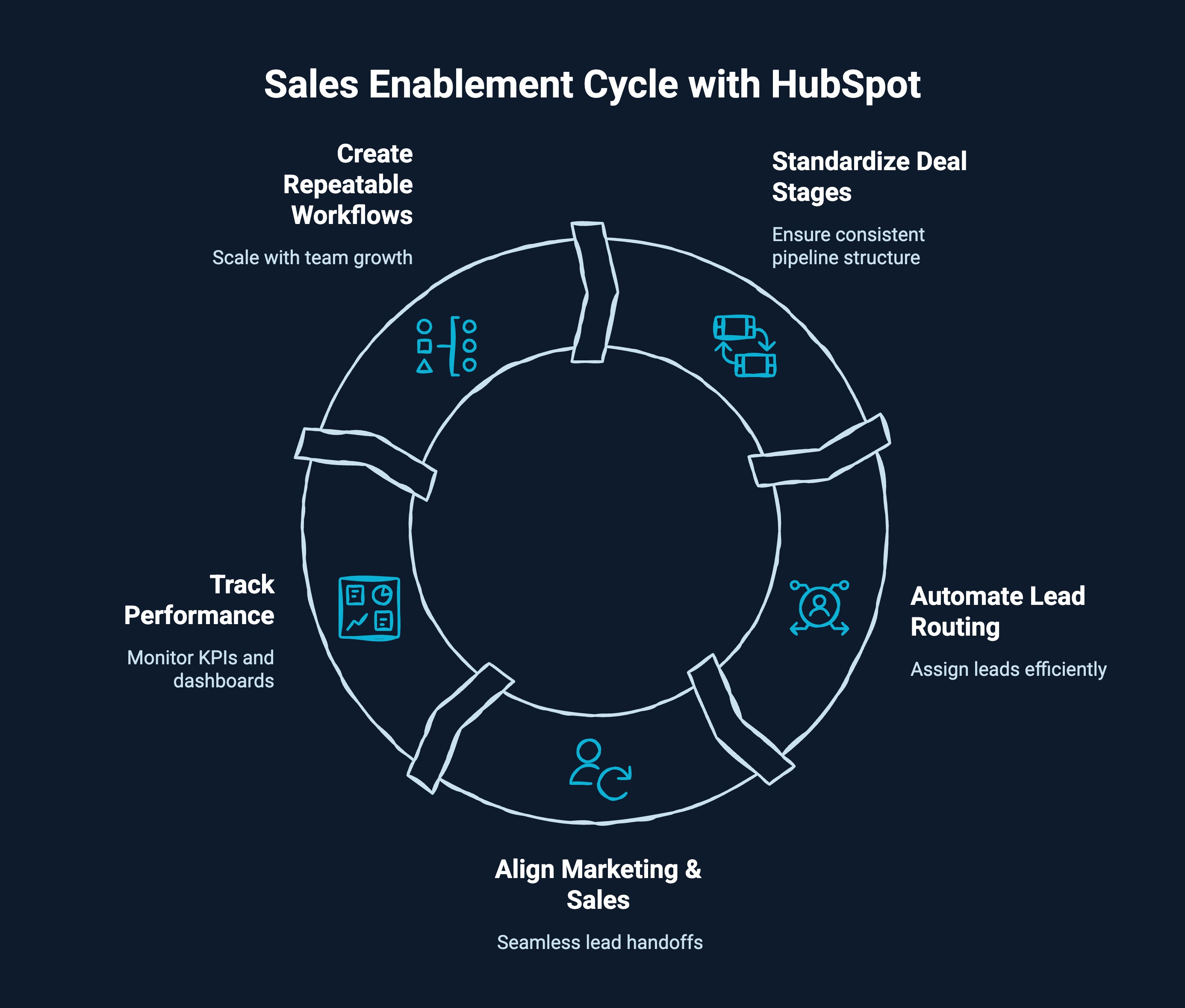
Many companies invest in tools but fail to define a clear process. Without a structured sales enablement strategy to support HubSpot, pipelines become inconsistent, follow-ups depend on individual habits, and reporting lacks accuracy.
A defined strategy inside HubSpot ensures sales operate with clarity, automation, and measurable outcomes. It helps businesses:
When strategy comes first, and the platform is configured around it, HubSpot and sales enablement work together to drive predictable pipeline movement and sustainable revenue growth.
Discover how manufacturers use HubSpot to streamline complex sales cycles and drive predictable growth in this practical guide on HubSpot for manufacturing.
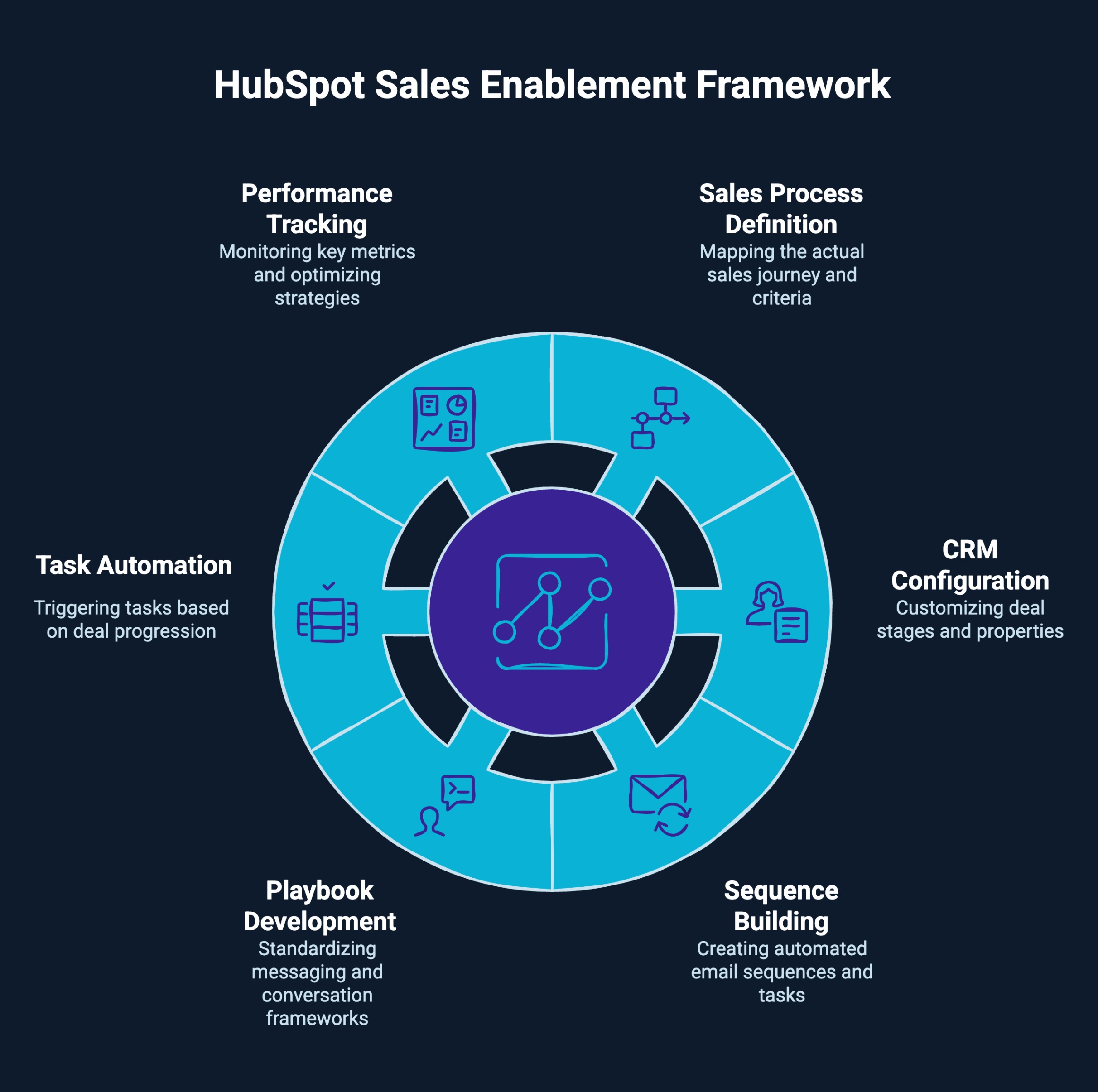
Understanding the tools is important. Implementing them in the right sequence is what drives results. Here is a structured approach to building a high-performing sales system inside HubSpot.
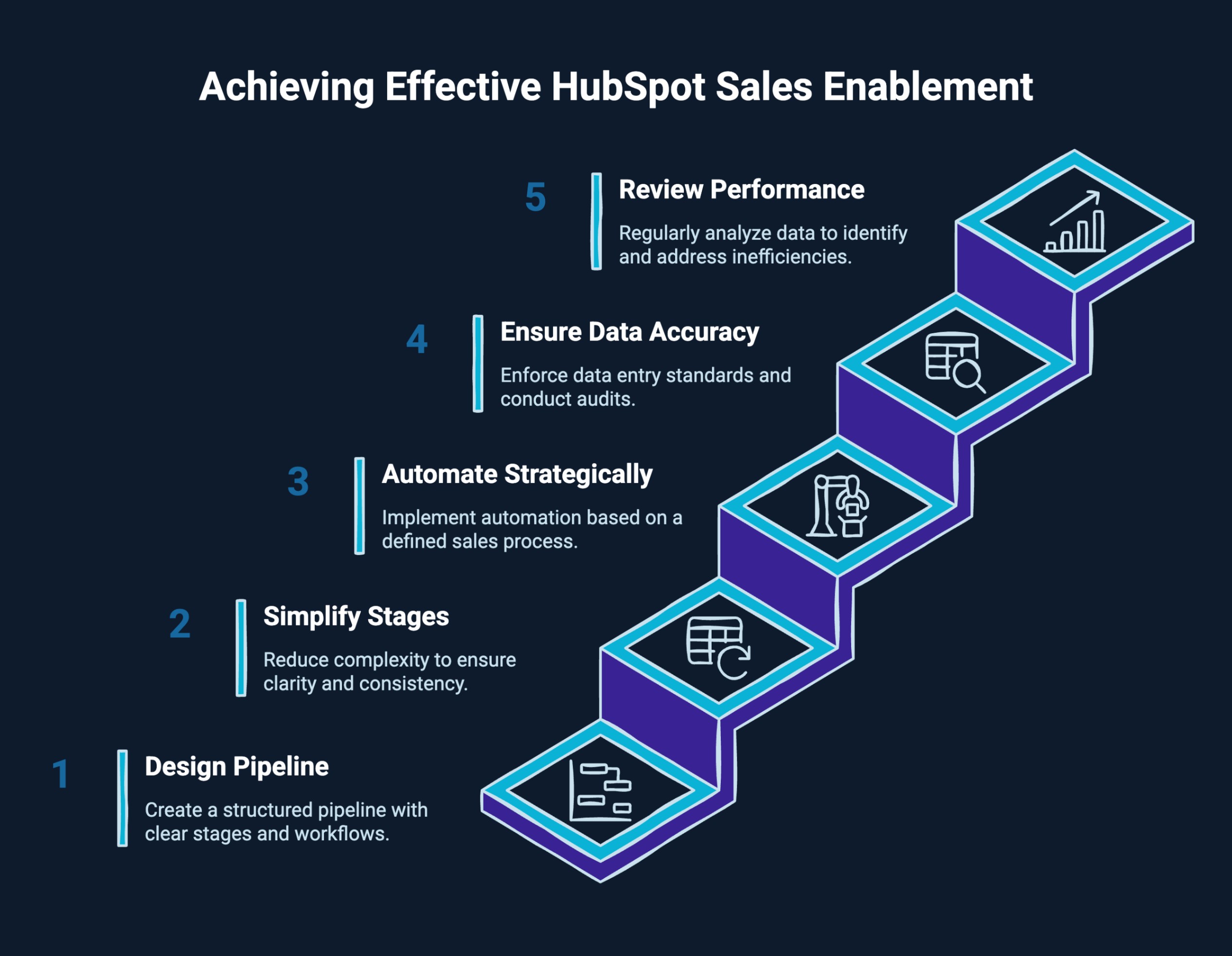
Before configuring anything, map your actual sales journey. Identify qualification criteria, buying triggers, decision-makers, average deal cycle length, and required actions at each stage. Your pipeline should reflect reality, not assumptions. Clear definitions improve forecasting and reduce confusion across the team.
Customize deal stages to match your defined process. Set required properties for qualification, deal amount, and close probability. Ensure lifecycle stages align with marketing handoffs. Clean configuration prevents reporting errors and keeps data reliable.
Create email sequences based on prospect type, deal size, or buying stage. Include task reminders for calls and personalized touchpoints. The goal is to create consistency without sacrificing relevance. Automation should support execution, not replace thoughtful outreach.
Build playbooks for discovery calls, qualification frameworks, objection handling, and closing conversations. Standardize templates while allowing room for personalization. This improves onboarding speed and ensures quality control across the team.
Use workflows to trigger tasks when deals move stages or when engagement thresholds are met. Define clear next-step requirements before a deal can advance. This enforces discipline and reduces pipeline leakage.
Create dashboards that monitor conversion rates, deal velocity, win rates, and stage drop-offs. Review performance regularly. Identify bottlenecks and refine sequences, qualification criteria, or messaging based on actual data.
Following this structure ensures that how to use HubSpot for sales enablement becomes a repeatable operational framework rather than a collection of disconnected features.
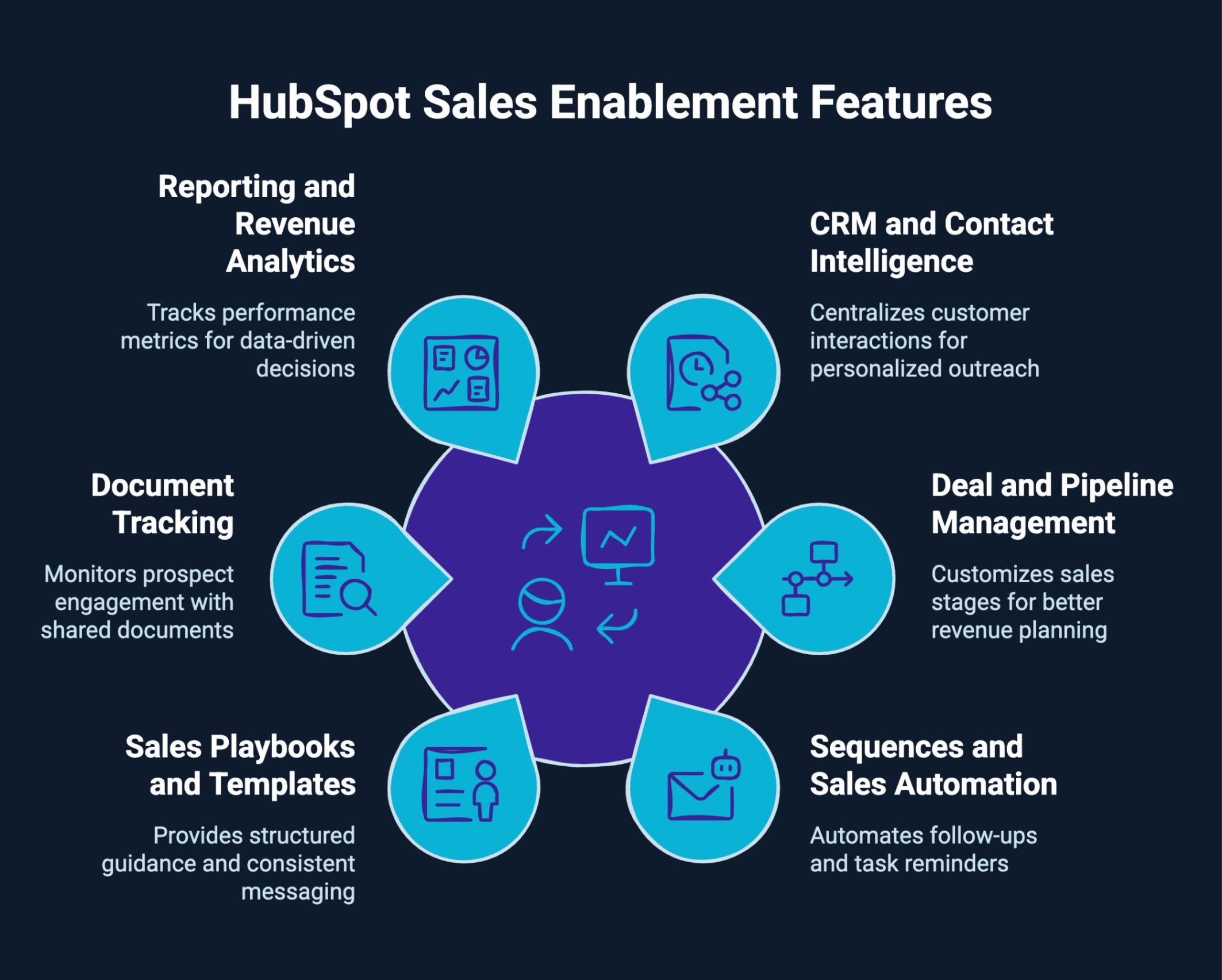
The strength of HubSpot as a sales enablement system comes from how its features connect data, automation, and performance tracking inside HubSpot. When configured properly, these capabilities support a structured and scalable sales process.
Key features include:
HubSpot centralizes every interaction in one unified contact record. Emails, calls, meetings, notes, deal updates, and marketing engagement history appear in a single timeline. Reps can quickly understand a prospect’s context before reaching out, which improves personalization and shortens sales cycles.
Example: Reviewing past email engagement and website activity before a follow-up call.
Customizable pipelines allow businesses to reflect their actual sales stages. Each deal progresses through clearly defined steps with associated actions and criteria. Managers gain visibility into stalled opportunities, pipeline value, and forecast accuracy, enabling better revenue planning.
Example: Using the pipeline view during weekly sales meetings to assess deal progression and forecast revenue.
Automated sequences combine scheduled emails and task reminders to ensure consistent follow-ups. Instead of relying on memory or manual tracking, reps can enroll prospects into structured outreach flows while still tailoring communication. This reduces delays and increases response rates.
Example: Running outbound SDR cadences with automated multi-step follow-ups.
Playbooks guide reps during calls with structured prompts for discovery, qualification, and objection handling. Templates and reusable snippets maintain consistent messaging across the team. This improves quality control and accelerates onboarding for new hires.
Example: Using a discovery playbook during calls to ensure all qualification criteria are covered.
Representatives can share proposals, pricing sheets, or contracts and see when prospects open or interact with them. These engagement signals help prioritize high-intent leads and time follow-ups strategically.
Example: Following up shortly after a prospect opens a pricing proposal.
Custom dashboards track performance metrics such as win rates, deal velocity, and revenue by stage or rep. Leaders can identify bottlenecks, measure effectiveness, and continuously refine the sales process based on real data rather than assumptions.
Example: Reviewing stage conversion rates monthly to improve forecasting accuracy.
Together, these features create a connected environment where sales teams operate with clarity, accountability, and measurable outcomes.
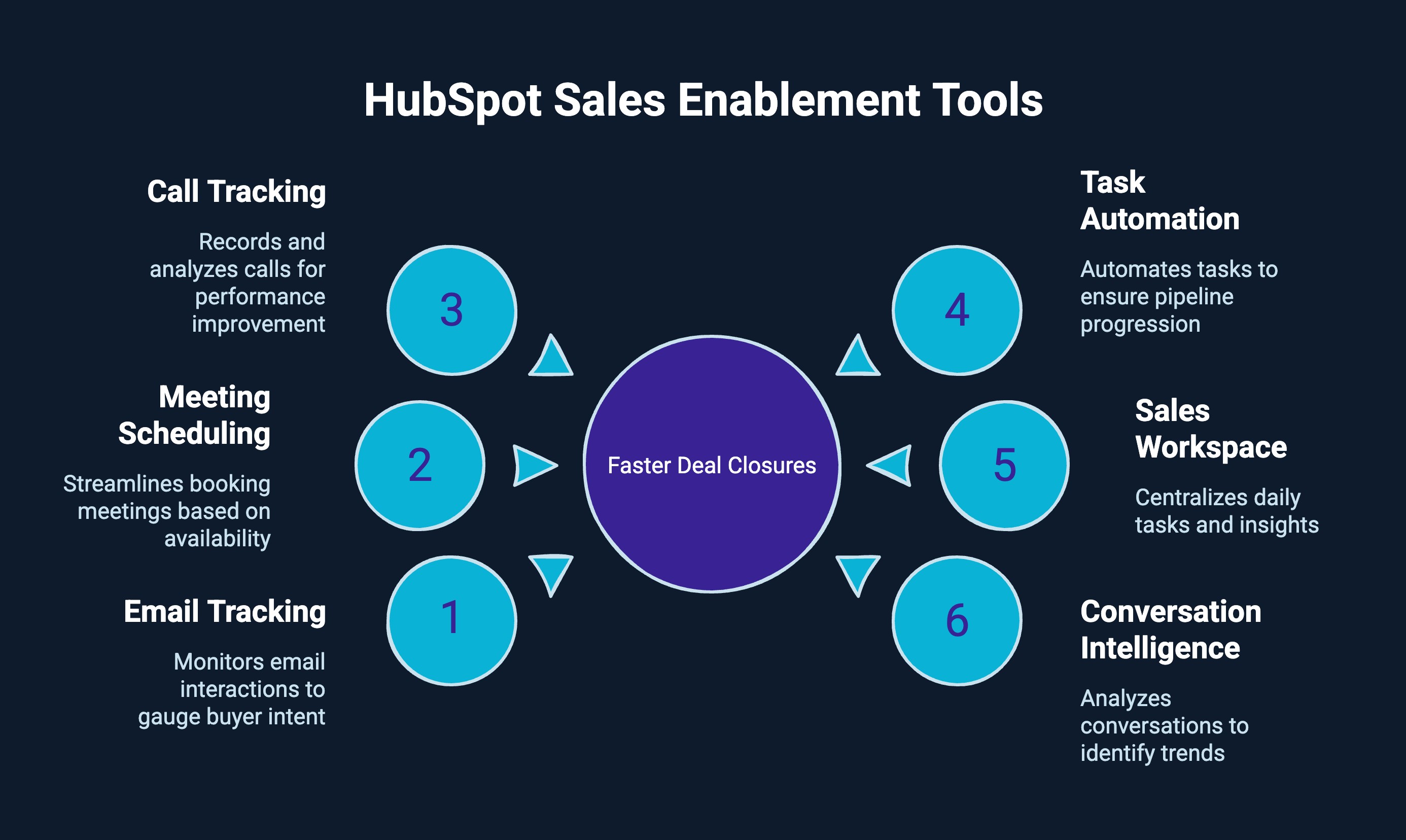
HubSpot’s sales tools are designed to reduce friction, strengthen follow-up discipline, and provide real-time visibility into buyer intent. When used strategically, they influence response speed, engagement quality, and overall conversion rates.
Email tracking goes beyond open notifications. Reps can see link clicks, repeated views, and recent activity, which signal intent. If a prospect repeatedly views a proposal or pricing email, that becomes a high-priority outreach opportunity. These shifts follow up from guesswork to behavior-driven action.
Scheduling links allow prospects to book meetings instantly based on real-time availability. Meetings automatically log under the correct contact and deal, while triggering reminders or follow-up workflows. This shortens response cycles and reduces drop-offs between interest and conversation.
Calls can be recorded, logged, and attached to contact records for full transparency. Managers can review conversations, evaluate objection handling, and analyze talk patterns. Over time, this builds a repeatable framework for high-performing sales conversations.
Tasks can be generated automatically when a deal changes stage or when a lead engages with content. This ensures structured progression through the pipeline and prevents opportunities from stalling due to missed follow-ups.
The sales workspace centralizes daily tasks, deal updates, and engagement insights into one focused view. Reps spend less time navigating dashboards and more time executing high-impact actions.
Conversation intelligence tools analyze transcripts and highlight trends across winning deals. Leaders can identify what messaging resonates, where friction occurs, and how top reps differentiate themselves. Coaching becomes data-driven and scalable.
Together, these tools strengthen execution discipline and create a measurable system for closing deals more consistently.
Learn how to automate your sales processes and boost efficiency with HubSpot’s tools in this practical guide to HubSpot sales automation.
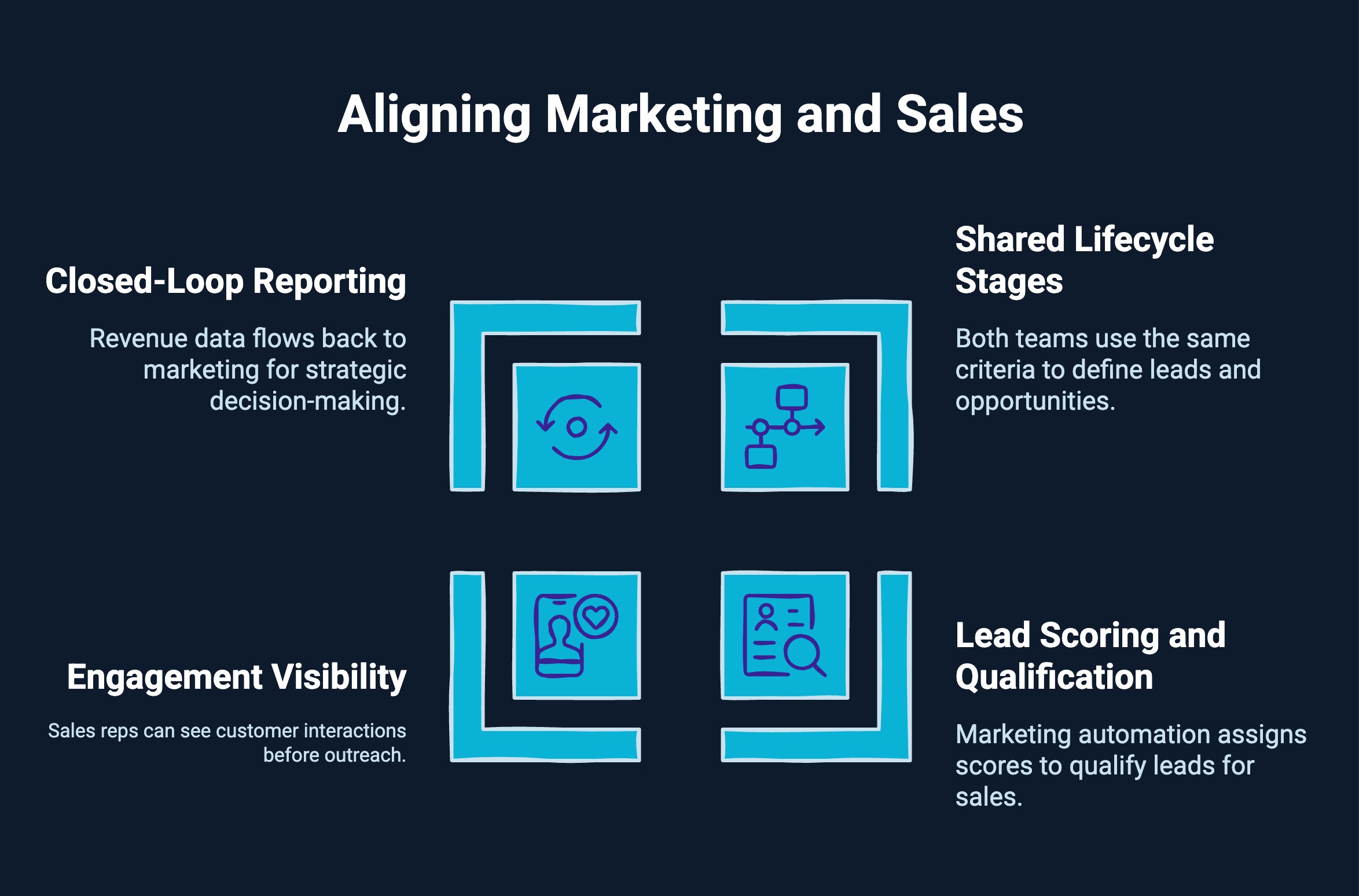
Marketing and sales often operate with different definitions, metrics, and goals. When handoffs lack clarity or data is fragmented, pipeline quality suffers. Aligning both teams inside HubSpot creates a shared system where data, processes, and revenue goals are connected, strengthening inbound sales alignment across the funnel.
A structured setup improves alignment in the following ways:
Both teams use the same criteria to define leads, Marketing Qualified Leads, Sales Qualified Leads, opportunities, and customers. This clarity streamlines the MQL to SQL transition, eliminates confusion around when a lead is sales-ready, and ensures smoother handoffs between marketing and sales.
Marketing automation assigns scores based on engagement and fit. When predefined scoring thresholds are met, leads move into structured sales workflows. This disciplined MQL to SQL transition improves conversion efficiency and reduces time spent on unqualified prospects.
Sales reps can see email interactions, page visits, content downloads, ad clicks, and campaign history before outreach. This shared visibility strengthens inbound sales alignment by enabling personalized conversations built on real buyer intent signals.
Revenue data flows back into marketing dashboards, enabling true closed-loop reporting. Leadership gains end to end visibility from first touch to closed deal, allowing both teams to optimize campaigns, messaging, and sales strategies based on revenue impact instead of isolated performance metrics.
When HubSpot and sales enablement operate within one unified structure, marketing and sales shift from siloed execution to measurable revenue collaboration, aligning strategy, execution, and accountability around shared growth goals.
See how combining Clay with HubSpot transforms data workflows and enhances customer insights with the Clay + HubSpot integration guide.
Even well-intentioned teams can limit results by misconfiguring systems or overlooking process discipline. Below are the most common mistakes, why they hurt performance, and how to fix them.
When HubSpot is used only to store contact information, its automation, pipeline management, and reporting capabilities remain unused. Reps log activity, but there is no structured progression, no task automation, and no measurable enablement framework.
Solution: Design your pipeline intentionally. Activate workflows, define lifecycle stages, and use dashboards tied to revenue metrics. Move from passive tracking to process-driven execution.
Adding too many deal stages or vague progression rules creates confusion. Reps move deals inconsistently, forecasting becomes inflated, and managers struggle to identify real bottlenecks.
Solution: Simplify stages to reflect actual buyer milestones. Define clear entry and exit criteria for each stage. Ensure every rep understands when and why a deal should advance.
Automation built without documented qualification logic often creates noise. Leads may receive irrelevant follow-ups, tasks trigger at the wrong time, and workflows overlap.
Solution: Map your sales process before building automation. Identify key triggers, buyer behaviors, and stage requirements. Build workflows that reinforce your defined process rather than replacing strategic thinking.
If reps skip required fields, fail to update deal stages, or log incomplete notes, reporting becomes unreliable. Leadership decisions then rely on flawed data, leading to poor strategic adjustments.
Solution: Enforce required properties, standardize naming conventions, and conduct regular CRM audits. Combine system enforcement with ongoing training to improve adoption and accountability.
Many teams configure their system once and rarely revisit it. Without reviewing conversion rates, stage drop-offs, and deal velocity, inefficiencies remain hidden.
Solution: Schedule monthly or quarterly performance reviews. Analyze dashboards, identify bottlenecks, and refine qualification criteria, messaging, and automation rules based on real outcomes.
Avoiding these mistakes ensures that your enablement system inside HubSpot remains structured, scalable, and aligned with revenue goals.
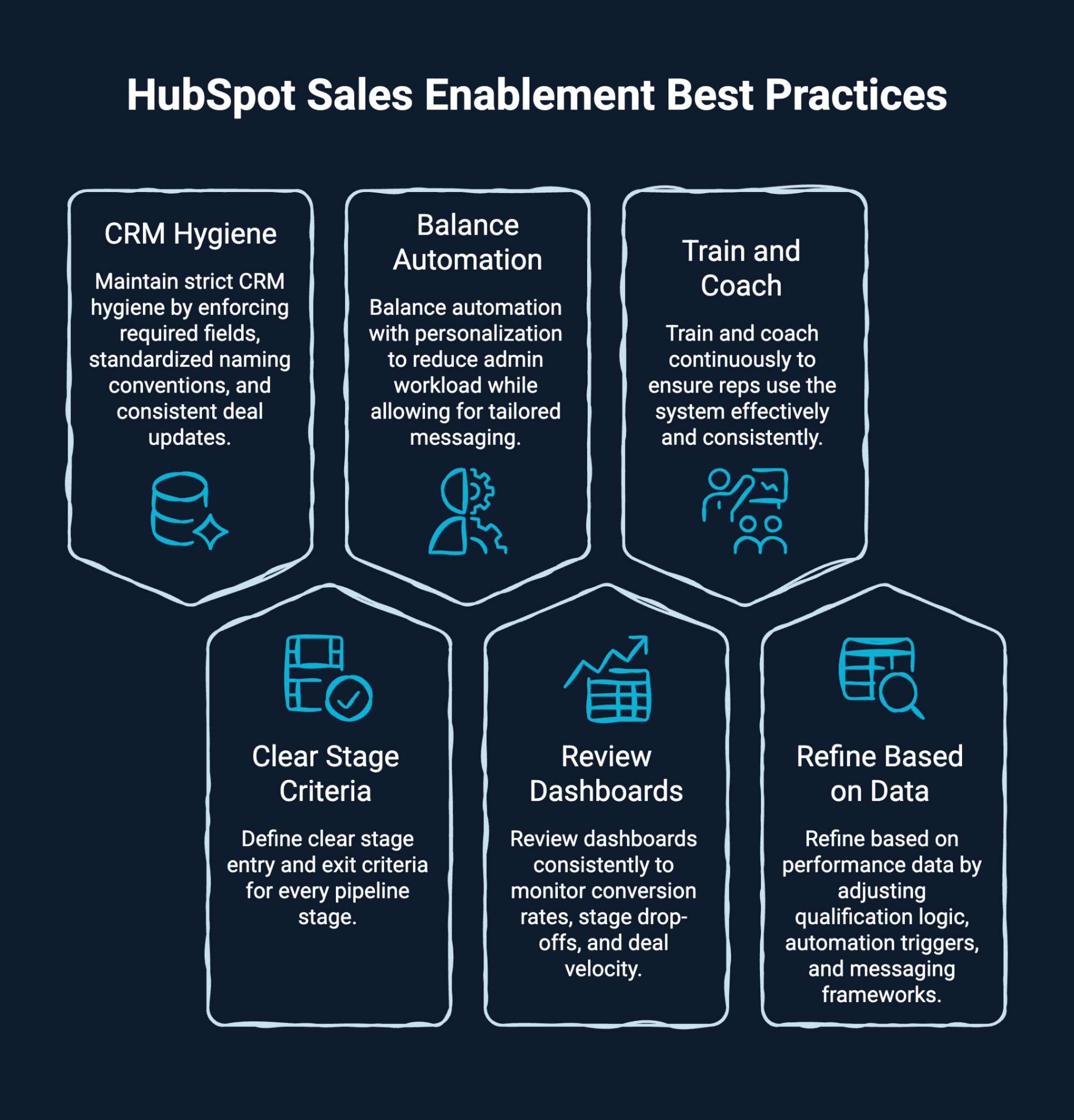
Having the right setup is only the beginning. Long-term success depends on disciplined execution and continuous optimization inside HubSpot. The following best practices ensure your system remains scalable and performance-driven.
When these best practices are applied consistently, HubSpot sales enablement becomes a structured growth engine rather than just a technology investment.
For growing teams, the real question is whether the system in place can support predictable and scalable revenue. HubSpot sales enablement becomes valuable when it turns daily sales activity into a structured, measurable, and repeatable growth engine.
Its impact becomes clear at different stages of growth:
When implemented strategically inside HubSpot, sales enablement becomes more than a toolset. It becomes a structured system that aligns teams, improves visibility, and drives sustainable revenue growth.
If your CRM feels underutilized or your outbound efforts lack consistency, LeadGem helps turn fragmented sales activity into a scalable revenue system.
LeadGem is a B2B growth and revenue operations agency headquartered in Amsterdam, the Netherlands. With over 5 years of experience in B2B growth marketing and growth hacking, the team builds and implements advanced RevOps and outbound lead generation systems designed for predictable pipeline growth.
Here is what makes them stand out:
For B2B companies serious about predictable growth, LeadGem builds the infrastructure that makes revenue scalable, not accidental.
Revenue becomes predictable when your process is predictable. That is the real power of HubSpot sales enablement.
When configured strategically inside HubSpot, your CRM stops being a tracking tool and becomes a growth engine. Pipelines gain clarity. Follow-ups gain discipline. Marketing and sales operate as one system. Decisions are backed by data, not guesswork.
The teams that scale are not the busiest. They are the most structured. Build the system right, optimize it consistently, and let your sales engine do what it is designed to do: close deals at scale.
HubSpot Sales Hub emphasizes inbound marketing, content creation, and streamlined customer relationship management within the HubSpot platform, improving sales productivity. Salesforce offers deeper customization in sales software, but HubSpot focuses on usability, faster onboarding, and aligned marketing efforts.
Yes. A HubSpot partner agency or marketing agency can provide sales enablement training, HubSpot CRM setup, sales pipeline optimization, email marketing workflows, lead qualification framework design, and sales strategy support tailored to specific needs.
Yes. The HubSpot platform provides beginner guides covering the sales enablement process, inbound marketing alignment, customer journey basics, and sales pipeline setup within HubSpot CRM and Sales Hub for new team members.
Leading sales enablement software includes HubSpot, Salesforce, and specialized sales software platforms. HubSpot Sales Hub ranks highly for usability, inbound marketing integration, content management, and strong customer relationship management capabilities.
Yes. HubSpot Academy offers sales enablement training, inbound marketing certifications, Sales Hub courses, and sales enablement certification programs designed to improve sales performance and key performance indicators.
You can access resources through the HubSpot platform, blog posts, case study materials, Academy lessons, and downloadable guides inside your HubSpot account. Many HubSpot partner agency websites also share PDFs covering sales pipeline optimization, email marketing, and customer satisfaction strategies.
A CRM manages customer data, tracks interactions, and organizes pipelines, while sales enablement equips teams with content and insights to close deals faster. Advanced systems combine both, using hubspot sales enablement platform features to align marketing, sales processes, and performance tracking.