

Contact


Most revenue teams are not short on leads. They are short on efficiency. According to Salesforce’s State of Sales research, reps spend only 28% of their time actually selling, with the majority consumed by admin work, data entry, and research.
The root problem is not effort. It is workflow design. When prospecting, enrichment, scoring, and routing are handled manually or stitched together without structure, teams waste time qualifying the wrong accounts while high-intent buyers slip through unnoticed.
Clay workflows fix this by operating as structured tables. Each row represents an account or contact, and each column performs enrichment, scoring, qualification, or automation logic. Instead of scattered tools, everything runs in one connected system.
This guide breaks down how to design high-performance clay workflows that systematically find, enrich, score, and route the right buyers. You will learn how to build revenue-aligned outbound systems and implement clay lead scoring and routing workflows that turn data into predictable pipeline growth.
Clay workflows are structured automation systems that help revenue teams find, enrich, score, and route buyers at scale. Instead of pulling static lists, teams build repeatable processes where data moves through defined steps such as discovery, enrichment, qualification, and activation.
At their core, clay workflows connect multiple data sources, apply scoring logic based on ICP criteria, and trigger actions automatically. Leads are enriched with firmographic and intent data, evaluated against qualification rules, and routed to the right rep or outbound sequence without manual intervention.
For SaaS teams, clay workflow SaaS systems act as the operational layer between market data and the CRM.
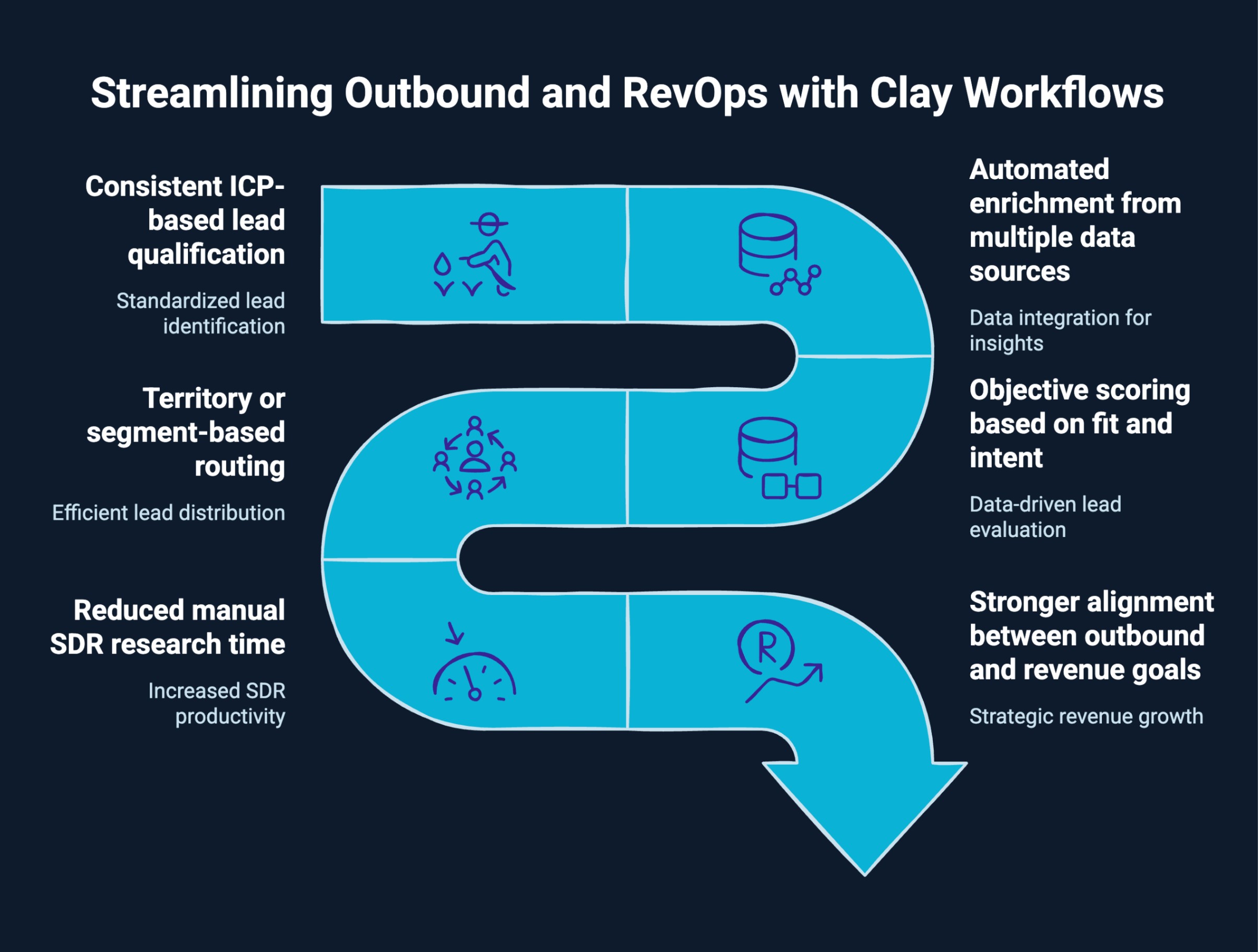
Outbound performance depends on precision and speed. Without structured systems, prospecting becomes manual, qualification becomes subjective, and follow-ups become inconsistent.
Clay workflows introduce standardized logic into how prospects are identified, evaluated, and activated, which directly improves pipeline quality and response rates.
For RevOps teams, workflows create operational control. Instead of relying on reps to interpret lead quality, enrichment rules, and scoring models, define what qualifies as a high-value account. This improves CRM hygiene, strengthens handoffs, and increases forecast reliability.
Well-designed clay workflows deliver measurable impact:
When structured correctly, clay workflows find enrich score target buyers inside one unified system. Prospecting stops being a one-off task and becomes a scalable revenue process.
Ready to target your ideal accounts with laser focus? See how Clay ABM helps you personalize outreach, prioritize high-value leads, and drive pipeline from the accounts that matter most.
Inside Clay, workflows operate as structured tables powered by column logic.
Each row represents a company or contact. Each column performs a defined action such as enrichment, contact discovery, scoring, filtering, or automation. Data flows horizontally across columns, progressively transforming a raw record into a qualified and activated opportunity.
A typical workflow looks like this:
Everything happens within the same table. There are no exports, no manual handoffs, and no disconnected tools. As new records enter the table, the same logic runs automatically.
That is what makes Clay workflows scalable. They are not one-time tasks. They are structured, continuously updating systems.
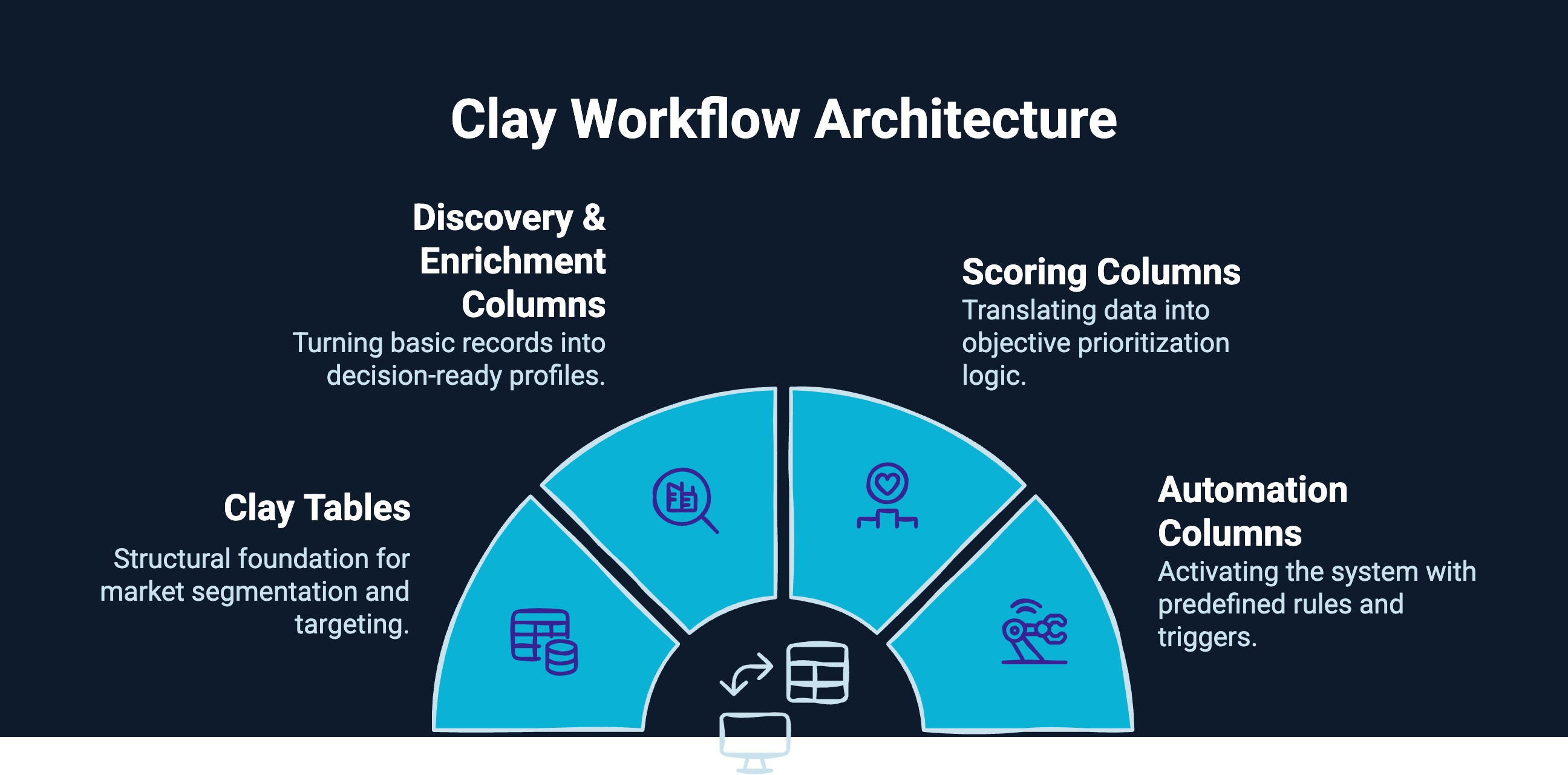
High-performing Clay workflows are not random automations stitched together. They are structured revenue systems built inside a clearly defined Clay architecture.
Instead of thinking in stages, think in infrastructure layers inside Clay itself: tables, columns, logic, and automation working together.
Here’s how that architecture is structured.
Clay tables are the structural foundation of your workflow. Each table represents a defined market segment, account list, or contact universe tied directly to revenue goals. Instead of scattered exports, tables centralize targeting logic, ownership, and segmentation so your outbound engine operates from one controlled data environment.
Enrichment columns turn basic company records into decision-ready profiles. By layering firmographic, technographic, contact-level, and intent data inside structured columns, you move beyond surface filtering. Each added column sharpens ICP alignment and reduces guesswork, ensuring outreach focuses only on qualified, revenue-relevant accounts.
Scoring columns translate raw data into prioritization logic. Rather than manually deciding who looks promising, fit and intent scores objectively rank accounts based on predefined criteria. This creates consistent qualification thresholds, aligns marketing and sales definitions, and ensures high-value prospects rise to the top automatically.
Automation columns activate the system. Once scoring thresholds are met, predefined rules trigger CRM updates, routing, alerts, or sequence enrollment. This removes manual handoffs and ensures qualified prospects move instantly from insight to execution, keeping pipeline momentum intact.

Once your Clay architecture is clear, implementation becomes structured and repeatable. Here’s how to build it inside Clay step by step.
Every strong Clay workflow starts with clarity on revenue targets and segment priorities. By aligning pipeline goals with rep capacity and historical win rates, you ensure automation scales qualified opportunity, not just activity volume.
Your discovery table defines who enters the system. By filtering companies based on industry, size, geography, funding, and growth signals, you prevent noise from entering the workflow and maintain a focused targeting strategy from the start.
Once discovery is structured, enrichment deepens qualification. Adding validated firmographics, technographics, role verification, and intent signals increases targeting precision and ensures outreach aligns with both fit and timing.
Scoring transforms enriched data into clear prioritization. By combining fit and intent into weighted revenue scores with defined thresholds, you create a repeatable qualification system that determines when a lead becomes actionable.
Routing ensures qualified leads reach the right owner without delay. Automation rules push prospects into the CRM, assign territories, and trigger outreach sequences, eliminating manual transfer errors and accelerating pipeline movement.
High-performing workflows evolve through feedback. Tracking replies, meetings, and revenue outcomes allows you to refine scoring weights and enrichment criteria, continuously improving targeting accuracy and pipeline performance.
Want faster prospecting and more qualified conversations? Check out how the Clay Sales Tool automates lead sourcing, enrichment, and personalization to help your team build a pipeline with less effort.
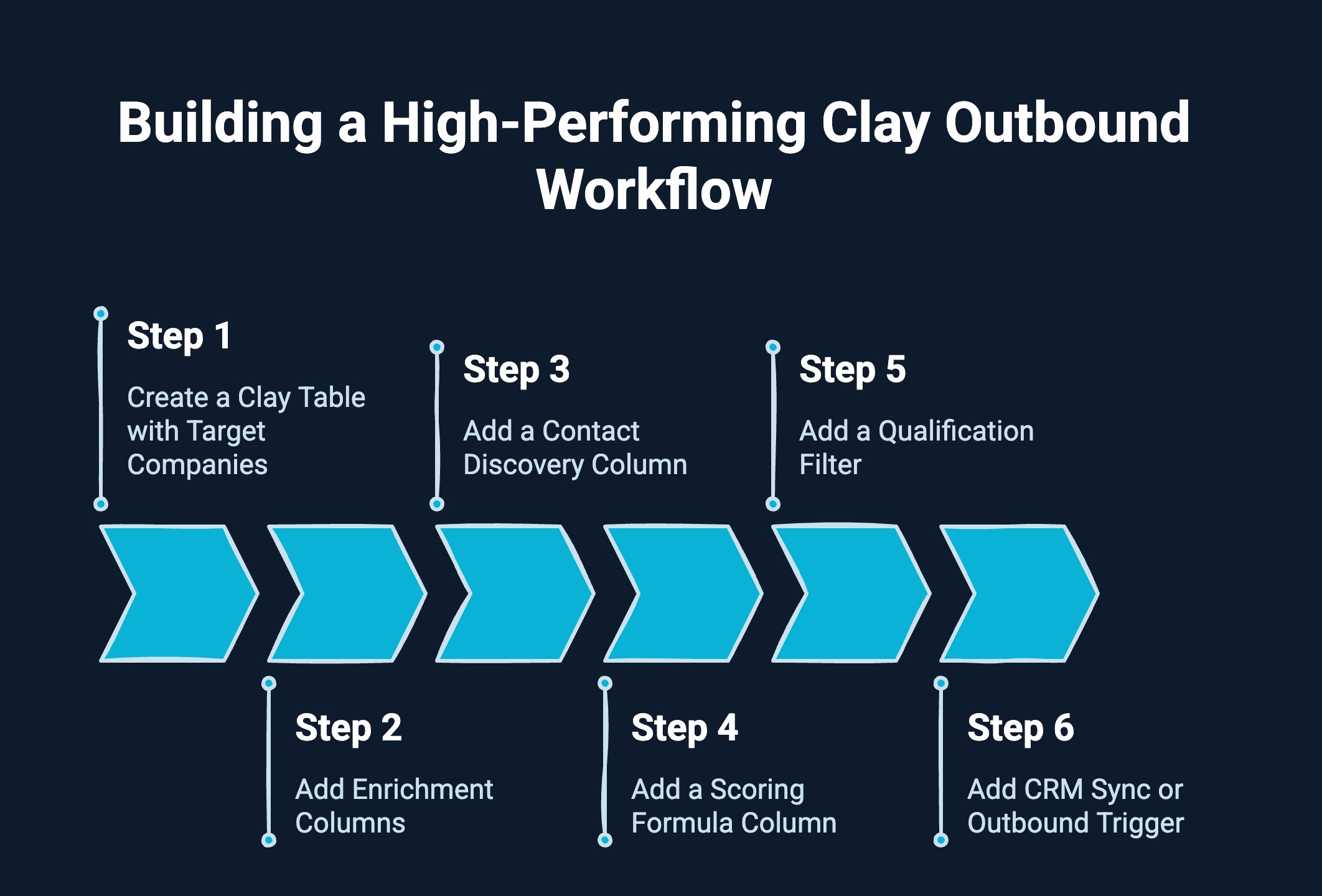
Here are the exact steps to build a high-performing Clay outbound workflow from discovery to activation. Follow this structured sequence to ensure your data flows cleanly from targeting to qualification to CRM execution.
Start by creating a Clay table that represents your ideal target account universe. Apply filters based on industry, company size, revenue range, geography, funding stage, or growth indicators. This table becomes the controlled entry point for your outbound engine and ensures only ICP-aligned accounts enter the workflow.
Next, layer enrichment columns to expand and validate company data. Add firmographic details, technographic compatibility, and growth indicators that confirm ICP fit. These columns improve targeting precision and prevent low-quality accounts from moving further into the system.
Once accounts are enriched, add a contact discovery column to identify relevant decision-makers. Filter by role, department, and seniority to ensure you’re targeting buying authority. This step bridges the gap between account qualification and actionable outreach.
Create a scoring formula column that combines ICP fit and intent signals into a structured priority score. Weight criteria based on revenue impact rather than simple activity signals. This converts enriched data into objective qualification logic.
Apply a qualification filter to automatically separate high-priority accounts from low-fit records. Define score thresholds that determine when a company becomes sales-ready. This ensures reps focus only on prospects with strong revenue potential.
Finally, connect qualified records to execution. Add automation that syncs data to your CRM, assigns ownership based on territory or segment, or enrolls contacts into outbound sequences. This closes the loop between intelligence and pipeline generation.
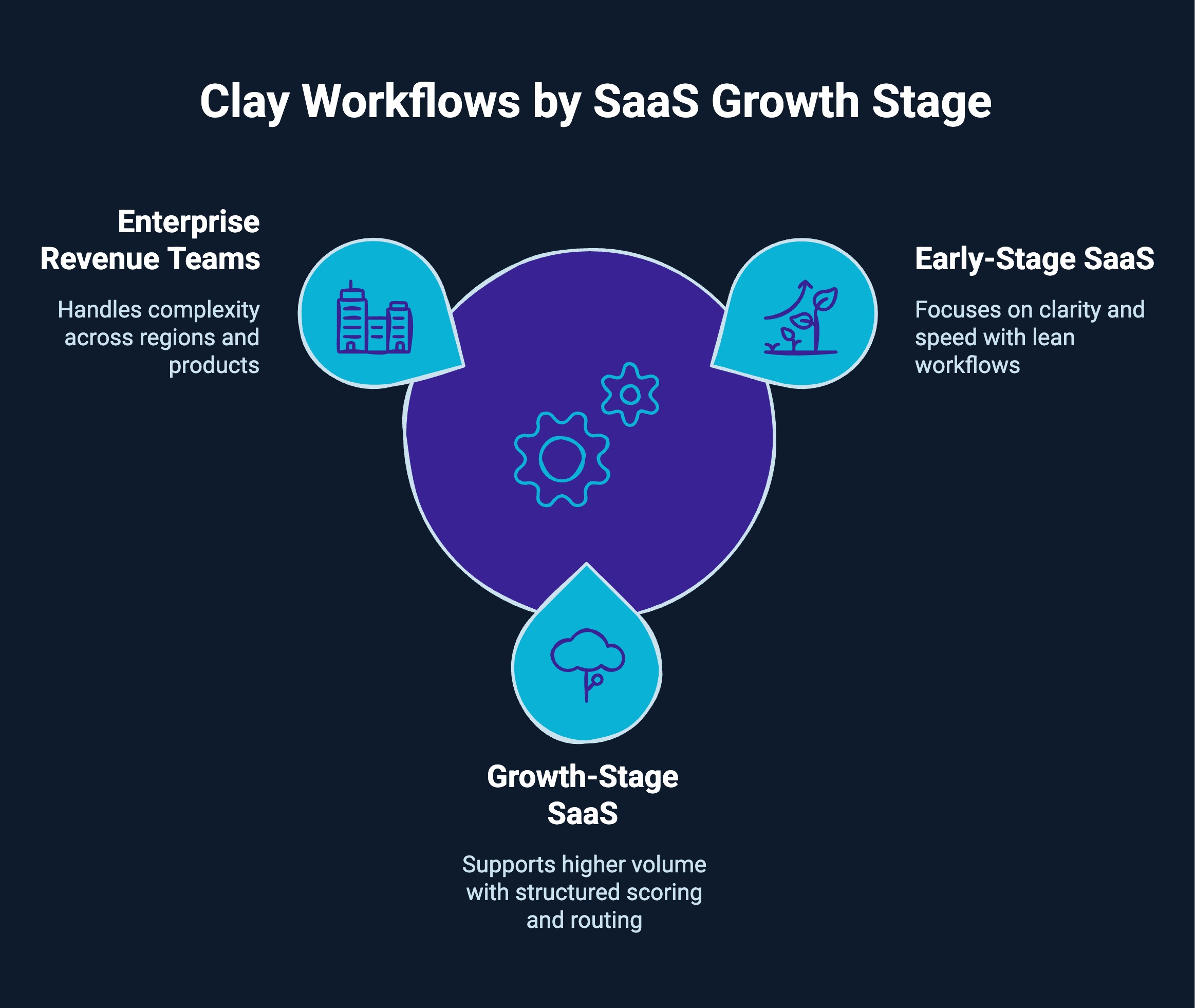
Not every team should build the same level of automation. The way you structure Clay workflow SaaS systems should evolve as your company grows. Complexity should match revenue maturity, not exceed it.
Here is how clay workflows typically differ by stage.
At this stage, the focus is on clarity and speed. Founders or small SDR teams need lean workflows that help validate ICP and generate an early pipeline.
Priority areas include:
The goal is learning and iteration, not full automation. Overbuilding at this stage creates an unnecessary operational burden.
As outbound scales, workflows must support higher volume while maintaining quality. This is where structured clay lead scoring and routing workflows become critical.
Key characteristics include:
At this stage, clay workflows find enrich score target buyers in a repeatable system that supports predictable pipeline generation.
For mature organizations, workflows must handle complexity across regions, products, and motions.
Advanced implementations often include:
Here, Clay functions as part of a broader RevOps infrastructure rather than a standalone prospecting tool.
The right clay workflow SaaS structure is not about adding more automation. It is about matching workflow design to revenue maturity, ensuring each stage of growth is supported by the right level of precision and control.
Ready to fuel your pipeline with high-quality leads? See how Clay Lead Generation helps you uncover, qualify, and convert prospects faster without manual grunt work.
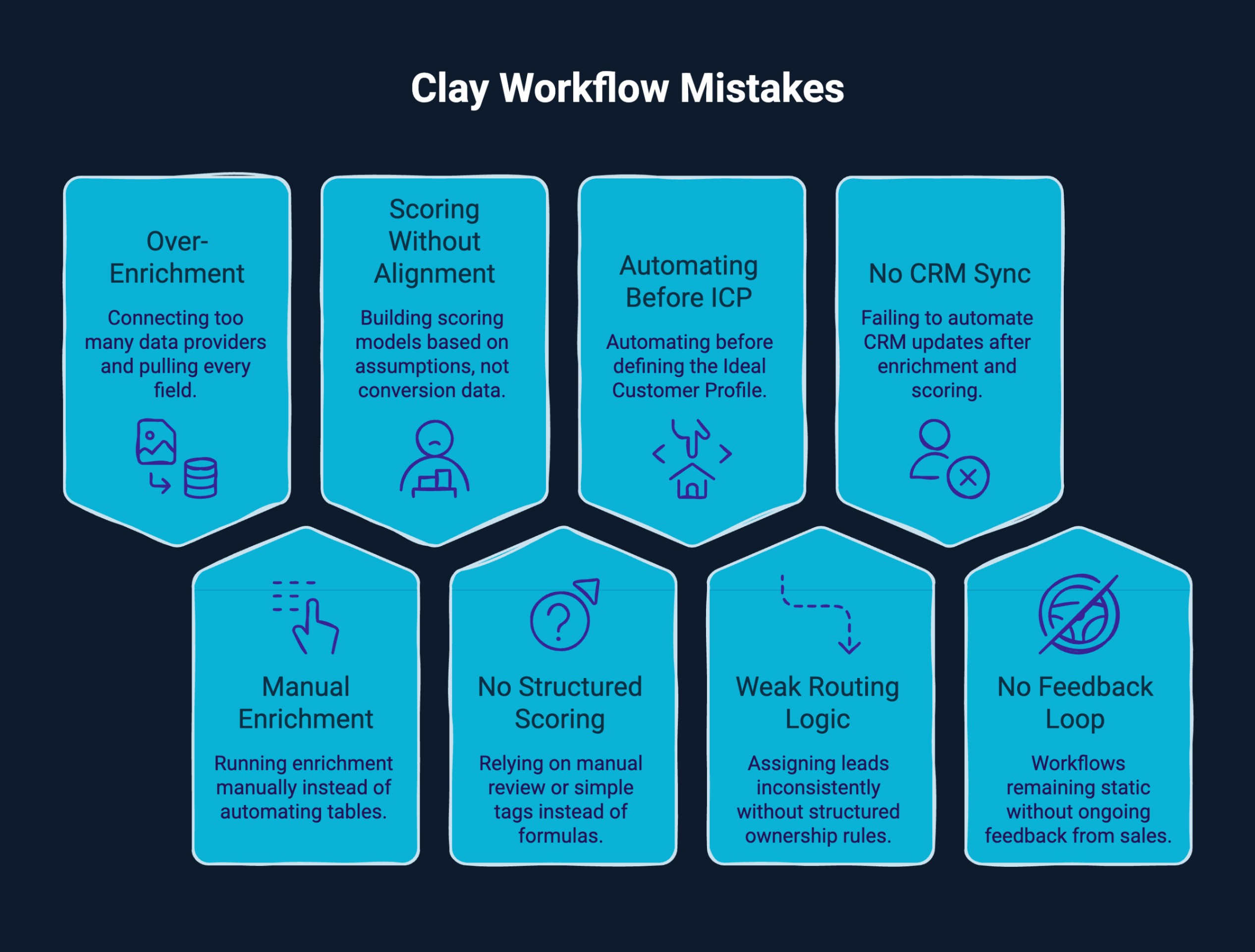
Clay is powerful, but poorly structured workflows can quietly scale inefficiency. Many teams prioritize automation speed over revenue alignment. Below are the most common mistakes and how they should be addressed.
Teams often connect multiple data providers and pull every available field. While this seems thorough, it creates clutter and slows qualification. Reps spend time reviewing data that does not influence buying decisions.
What to do instead: Enrich only the fields that directly impact ICP validation, scoring logic, or routing. Every data point should support qualification or prioritization.
Some teams treat Clay like a one-time enrichment tool. They run data pulls manually, export lists, and repeat the process later. This removes the compounding advantage of automated workflows.
What to do instead: Structure tables so enrichment runs automatically as new records enter. Clay tables should function as living systems that continuously update, not static spreadsheets.
Teams sometimes build scoring models based on assumptions rather than conversion data. They weigh attributes that appear important but are not tied to closed-won outcomes. As a result, Clay's lead scoring and routing workflows prioritize the wrong accounts.
What to do instead: Anchor scoring models to historical win rates and real sales feedback. Adjust fit and intent weighting based on measurable revenue impact.
Some workflows rely on manual review or simple tags instead of structured scoring formulas. Without formula-driven logic, prioritization becomes inconsistent and difficult to scale.
What to do instead: Use Clay formulas to combine fit, intent, and behavioral criteria into weighted scores. This ensures qualification remains objective and repeatable across segments.
Automation amplifies whatever criteria exist in the system. If your Ideal Customer Profile is unclear or overly broad, workflows will scale low-quality accounts and dilute pipeline value.
What to do instead: Clearly define ICP segments, buyer roles, and revenue characteristics before building automation. Workflows should reinforce strategic targeting, not compensate for weak definition.
Leads may be enriched and scored correctly, but assigned inconsistently. Without structured ownership rules, high-priority accounts can sit idle or be misrouted.
What to do instead: Implement clear routing logic based on territory, segment, or product line. Add CRM governance controls to prevent duplication and ensure accountability.
Some teams stop at enrichment and scoring but fail to automate CRM updates. This creates delays, duplicate entries, and manual handoffs that reduce speed to lead.
What to do instead: Automatically sync qualified records into the CRM with predefined ownership and stage mapping. Ensure routing triggers are immediately triggered once qualification thresholds are met.
Workflows cannot remain static. Without ongoing feedback from SDRs and AEs, scoring criteria and enrichment layers become outdated as markets evolve.
What to do instead: Establish structured review cycles where sales teams flag lead quality and conversion patterns. Use this insight to refine scoring thresholds and enrichment logic over time.
Clay workflows succeed when automation follows structured revenue thinking. Avoiding these mistakes ensures you scale precision, consistency, and predictable pipeline growth, not inefficiency.
Curious how agencies can drive better results with Clay? Learn how Clay for Agencies boosts efficiency, scales client pipelines, and simplifies reporting without extra manual work.
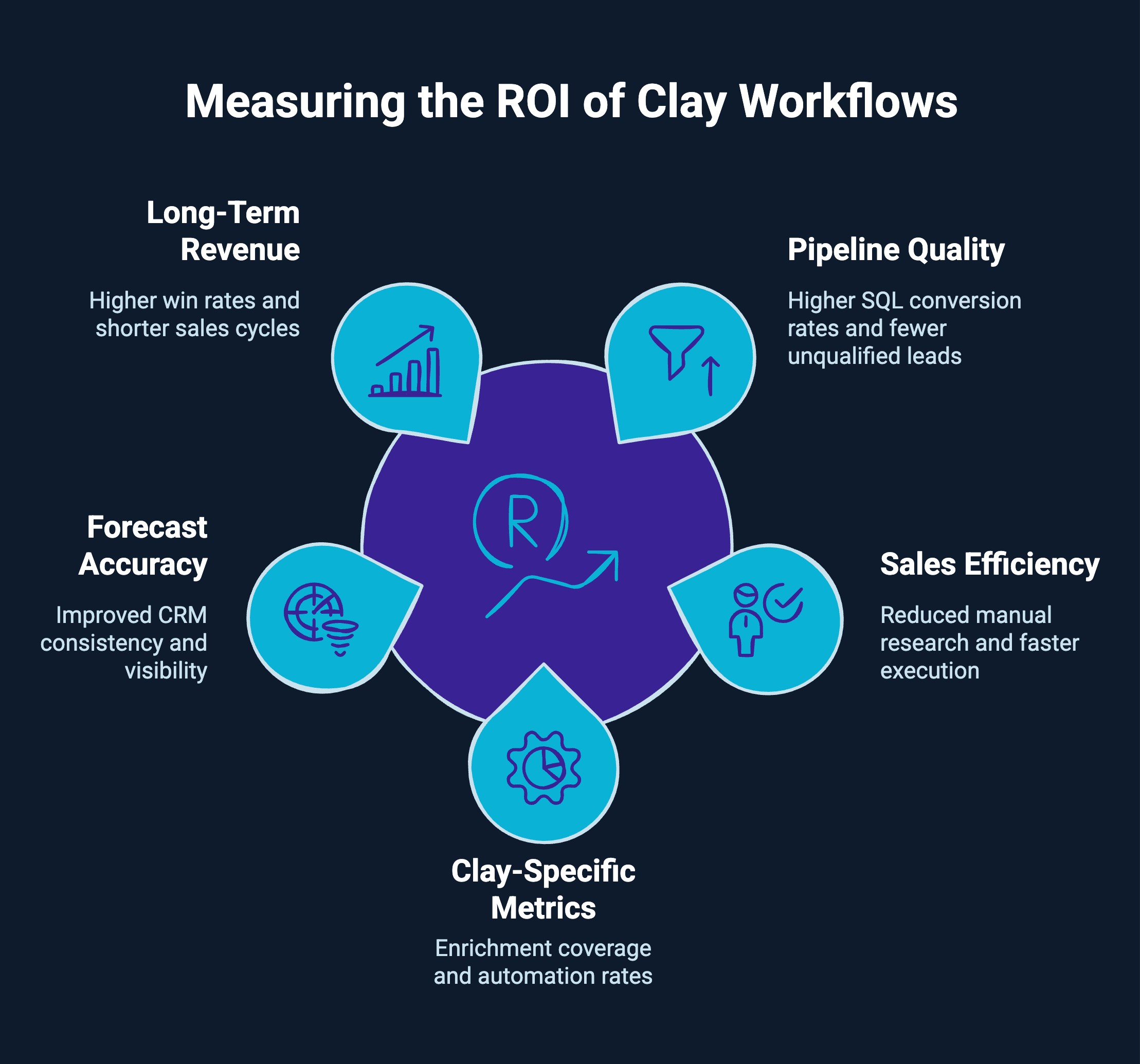
Clay workflows should be measured by revenue impact, not activity volume. When properly structured, their return shows up in pipeline quality, sales efficiency, and forecast reliability.
If workflows are effective, the quality of opportunities entering the pipeline improves. You should see higher SQL conversion rates, stronger meeting-to-opportunity ratios, and fewer unqualified leads reaching sales. Well-built Clay lead scoring and routing workflows prioritize accounts that are more likely to convert, increasing overall pipeline value and reducing wasted outreach.
A strong workflow reduces manual research and accelerates execution. SDRs spend less time enriching records and more time engaging qualified buyers. Faster routing and cleaner handoffs improve speed to lead and increase outbound capacity without expanding headcount. Metrics like SDR research time reduction and routing time reduction directly reflect operational gains.
Beyond pipeline outcomes, Clay performance can be measured inside the workflow itself:
These metrics show whether your workflow is actually removing manual work and increasing system efficiency.
Structured workflows improve CRM consistency and visibility. Data becomes more complete, duplicates decrease, and qualification thresholds are standardized. This strengthens pipeline tracking and improves forecast reliability because leadership can trust that opportunities meet defined criteria.
Over time, the effect compounds. Better targeting and qualification contribute to higher win rates, shorter sales cycles, and improved pipeline velocity. When Clay workflows consistently find, enrich, score, and activate the right buyers, revenue becomes more predictable and scalable.
At LeadGem, we are a B2B growth and revenue operations agency headquartered in Amsterdam, the Netherlands. With over 5 years of experience in B2B growth marketing and growth hacking, we design and implement advanced RevOps and outbound systems built for predictable pipeline generation.
As a Clay-certified partner, we help companies automate sales processes, enrich lead data, and build structured Clay lead scoring and routing workflows that align directly with revenue goals. Our focus is not just automation. We build revenue architecture that turns Clay into a scalable outbound engine.
We support companies across the Benelux (the Netherlands and Belgium), the Nordics (Sweden, Norway, and Denmark), the Americas, and Australia.
By combining strategic RevOps design with hands-on implementation, we build structured systems that consistently identify, enrich, score, and activate target buyers to drive sustainable, measurable revenue growth.
Clay workflows are not about more automation. They are about better revenue design.
When enrichment, scoring, and routing align with clear pipeline goals, outbound becomes predictable and scalable. Clay workflows find enrich score target buyers only when built on structured logic, not random automation.
If your pipeline feels inconsistent, refine the architecture. The right workflow turns data into revenue.
Start by pulling company data into a Clay table, applying data enrichment, and scoring new leads based on job title, funding rounds, or recent news. Connect N8N for real-time triggers, native integrations, and automated cold emails to streamline the sales process.
Define your target industry and list of companies, enrich contact data such as email address and phone numbers, score based on buying signals, and launch cold outreach. Use clay automation and marketing automation to reduce manual effort and accelerate your sales pipeline.
Yes, many key use cases include lead generation, job change tracking, website visitor targeting, and funding rounds alerts. Start with prebuilt custom workflows, then tailor enrichment logic, outreach campaigns, and scoring models to your niche markets and tech stack.
Sync enriched contact data from a Clay table into HubSpot using native integrations. Apply scoring rules, map ownership fields, and trigger automated lead routing based on job title, target industry, or sales pipeline stage to reduce manual work.
Capture new leads, enrich contact information in real time, score by intent and fit, and auto-assign sales reps. Connect marketing automation to trigger follow-ups and update the CRM to streamline the entire sales process.
Import a list of companies, enrich company data from B2B sources, validate tech stack, funding rounds, and company news, then flag inconsistencies. This ensures accurate targeting and a higher fill rate before outreach campaigns begin.
Start with target companies, enrich contact details, apply fit and intent scoring, and automate cold outreach. The best clay outbound workflow aligns data enrichment, routing logic, and sales tools to accelerate a qualified pipeline.
Clay is not a traditional CRM. It is built for data enrichment, lead generation, and workflow automation. It complements sales tools by feeding enriched contact data into your CRM for better pipeline management.
Upload contact information into a Clay table, connect B2B data providers, enrich email addresses, phone numbers, job titles, and company websites, then validate accuracy before pushing enriched contact data into your CRM or outreach campaigns.